We've captured the moments from FabCon & SQLCon that everyone is talking about, and we are bringing them to the community, live and on-demand. Starts on April 14th. Register now
Hi
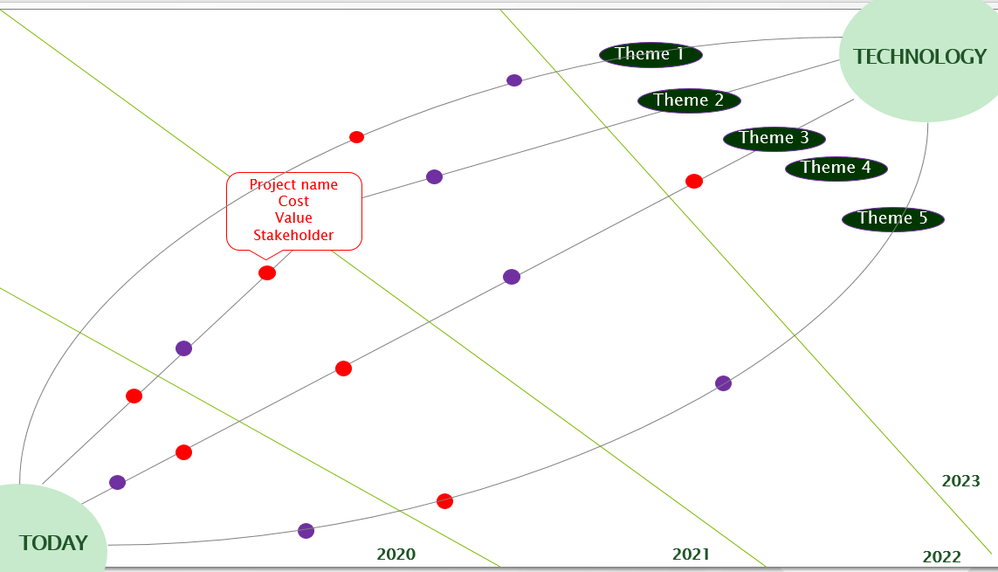
I would like to create a visualisation that has three curved threads and each thread is a specific category with my projects that fall within the category....on the x-axis I would need 2020-2023 so It demonstrates each product evolution per category/theme per year....can someone help?
@Yashica seems like you can achieve this by using line chart visual
- putting date/year on x-axis
- category on legend
- value your want to measure on value
Subscribe to the @PowerBIHowTo YT channel for an upcoming video on List and Record functions in Power Query!!
Learn Power BI and Fabric - subscribe to our YT channel - Click here: @PowerBIHowTo
If my solution proved useful, I'd be delighted to receive Kudos. When you put effort into asking a question, it's equally thoughtful to acknowledge and give Kudos to the individual who helped you solve the problem. It's a small gesture that shows appreciation and encouragement! ❤
Did I answer your question? Mark my post as a solution. Proud to be a Super User! Appreciate your Kudos 🙂
Feel free to email me with any of your BI needs.
Hello Parry,
thank you for the reply
to be more concrete here is an illustration
Hi @Yashica ,
Please check if the following post is applicale for your scenario.
Throwing a Curve at the Power BI Line Chart
Best Regards
Rena
If you have recently started exploring Fabric, we'd love to hear how it's going. Your feedback can help with product improvements.
A new Power BI DataViz World Championship is coming this June! Don't miss out on submitting your entry.
| User | Count |
|---|---|
| 56 | |
| 40 | |
| 36 | |
| 18 | |
| 18 |
| User | Count |
|---|---|
| 70 | |
| 67 | |
| 38 | |
| 34 | |
| 23 |