Get certified for free when you join Fabric Data Days 2026 and dive into Fabric, Power BI, SQL, AI, and other essential data skills.
Join nowJuly 7 - July 17 | Round 2 of the Power BI Dataviz World Championships. Don't miss your chance! Learn more
Hi @Cpgbi
I came up with new thoughts about this question, you mentioned that "it can’t be refreshed because the credentials are invalid when going into app.powerbi to see the dataset", the error typically happens when the credentials of the dataset been changed.
You can do a test on the desktop, connect to the data source and manually refresh it, if it failed, please clear the datasource setting and relogin.
If it still doesn't work, please kindly share the error details when "she gets the data source error when publishing."
Hi @Cpgbi
What do you mean" But if the report is emailed to me I can publish it just fine", Not quite understand your scenario, could you please share more details with screenshots?
Hi @Cpgbi
1. If publish from the Desktop is not working, try to connect to the data from the Power BI Site.
Get Data -> Files (Get) -> Local Files -> find your PBIX file on local drive.
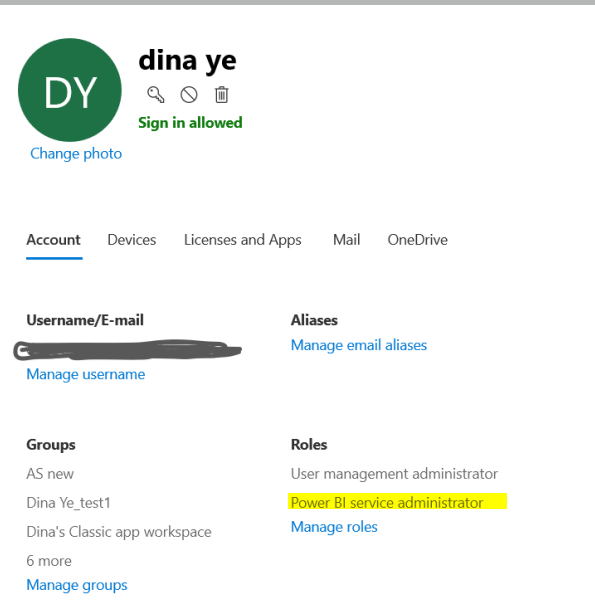
2. Make sure she has the role of power bi service administrator. you can check it in 365 admin portal.
My datasource is connected to snowflake and does not reside in my local so this solution would not work. Is there any other workaround?
Join us in Barcelona for FabCon and SQLCon, the Fabric, Power BI, SQL, and AI community event. Save €200 with code FABCMTY200.
Join Fabric Data Days 2026: 60 days of free live/on-demand sessions, challenges, study groups, and certification opportunities.
| User | Count |
|---|---|
| 22 | |
| 22 | |
| 18 | |
| 17 | |
| 13 |
| User | Count |
|---|---|
| 61 | |
| 52 | |
| 47 | |
| 40 | |
| 38 |