This is best Fabric, Power BI, SQL and AI community event. How do we know? The last event sold out! Save €200 with code FABCMTY200.
Register nowA new Data Days event is coming soon! This time we’re going bigger than ever. Fabric, Power BI, SQL, AI and more. Don't miss out.
I would like to load data from Google Analytics into Power BI. After transforming the data in the Query Editor, I apply the changes. At first, I see the message 'Waiting for www.googleapis.com' and the number of rows increases. After a while, I get the following error message:
Failed to save modifications to the server. Error returned: 'OLE DB or ODBC error: [DataSource.Error] There was an internal error..'
How can I solve this error?
I am a new member thanks for understanding!!!
Thank you in advance
Solved! Go to Solution.
Hi @Anonymous
For each table, try checking the data types of your columns then refresh only the selected table.
Did it work ? 👌 Mark it as a solution to help spreading knowledge 👍 A kudos would be appreciated
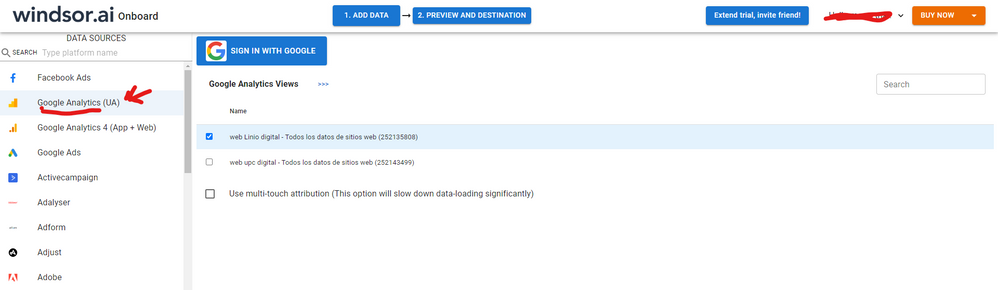
Hi. As a workaround, maybe you can try to test your connection with a 3rd party connector. I've tried windsor.ai, supemetrics and funnel.io. I stayed with windsor because it is much cheaper so just to let you know other options. In case you wonder, to make the connection first search for the GA connector in the data sources list:
After that, just grant access to your GA account using your credentials, then on preview and destination page you will see a preview of your GA fields:
There just select the fields you need. Finally, just select PBI as your data destination and finally just copy and paste the url on PBI --> Get Data --> Web --> Paste the url.
Hi @Anonymous ,
First go to edit query and verify the data types and change the data types if needed, after that if you still facing this error, you need to keep open the app.powerbi.com while refresh your PBI dashboard.
Best Regards,
Stephen Tao
If this post helps, then please consider Accept it as the solution to help the other members find it more quickly.
Hi @Anonymous
For each table, try checking the data types of your columns then refresh only the selected table.
Did it work ? 👌 Mark it as a solution to help spreading knowledge 👍 A kudos would be appreciated
Hi @DataVitalizer @Anonymous problem was indeed the data types. I retreive some data from GA while a column have both numbers and <no set> values, while i remove the <no set> values and change the datatype everything was working fine. Btw do you have any reasoning why this <no set> values coming or is a problem in the data it self?
Thank you for your prompt response
Sign up to receive a private message when registration opens and key events begin.
If you have recently started exploring Fabric, we'd love to hear how it's going. Your feedback can help with product improvements.
| User | Count |
|---|---|
| 33 | |
| 25 | |
| 23 | |
| 20 | |
| 15 |
| User | Count |
|---|---|
| 64 | |
| 41 | |
| 27 | |
| 22 | |
| 22 |