Join us at FabCon Atlanta from March 16 - 20, 2026, for the ultimate Fabric, Power BI, AI and SQL community-led event. Save $200 with code FABCOMM.
Register now!The Power BI Data Visualization World Championships is back! Get ahead of the game and start preparing now! Learn more
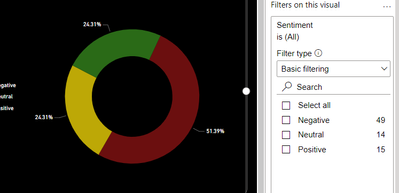
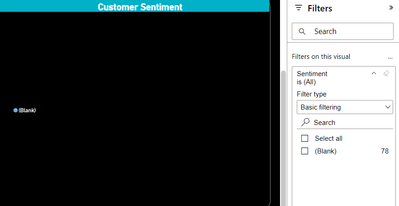
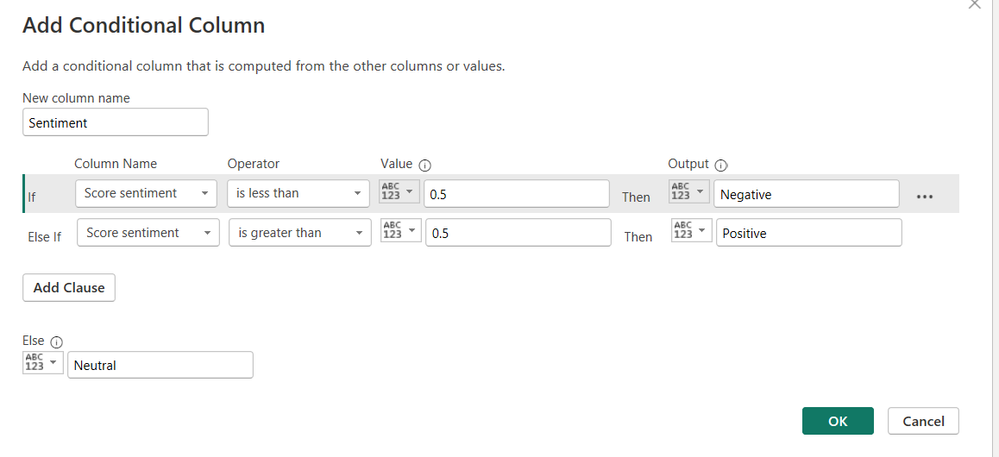
I'm encountering an issue with displaying sentiment analysis data in my Power BI service. I've performed sentiment scoring on the data using Text Analytics, then set the data type to percentage. I've also added a conditional column based on the sentiment score and set its data type to text. In the app, I've used a donut chart to visualize the sentiment analysis. However, when I publish the data to the service, it appears blank without showing the visual.
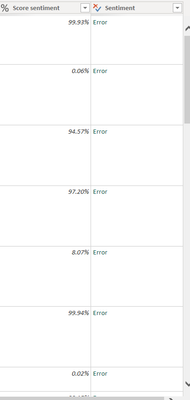
After reading through some forum posts, I attempted to change the data type of the sentiment analysis to True/False or binary, but encountered an error. Any suggestions on how to resolve this issue? Thanks
Hello @Muniba .
so what you should do is download this pbix file that is showing blank from the service and open it and go to this conditional column and check it.
i think that power bi changed it to other values like 0, -1 and its not like the one you've made in desktop.
Proud to be a Super User! | |
Hello.
Thank you for your response. I've downloaded the file and verified the conditional column in Power Query, and it appears to have the correct data. However, when I check the data in the Power Bi app -- data view, both the score sentiment and the sentiment (conditional column) appear as blank.
Upon refreshing the data, the values do appear, but after some time, they revert to being blank again
Hello @Muniba ,
change the conditional formatting to true and false not text.
Proud to be a Super User! | |
Hello
I have already tried this but getting this error
Expression.Error: We couldn't convert to Logical.
Details:
Positive
@Muniba , what's the logic of the column.
Proud to be a Super User! | |
The Power BI Data Visualization World Championships is back! Get ahead of the game and start preparing now!
| User | Count |
|---|---|
| 38 | |
| 36 | |
| 33 | |
| 30 | |
| 28 |
| User | Count |
|---|---|
| 128 | |
| 88 | |
| 79 | |
| 67 | |
| 62 |