cancel
Showing results for 
Search instead for 
Did you mean: 

The Power BI Data Visualization World Championships is back! Get ahead of the game and start preparing now! Learn more

Reply
miro_x
Regular Visitor

Data shaping problem

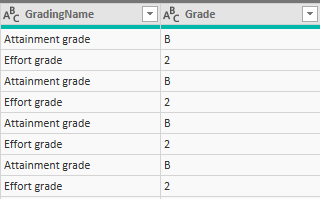
I want my data below to display two columns, one for Attainment grade and another for Effort grade so that I can treat them as independent data types. Any suggestions on how best to achieve this? The only thing I can come up with is to copy the huge table (there are over 20 columns) two times, filter one to display "Attainment grade" and the other to display "Effort grade" only in the query editor and then join them via a relationship, this feels really messy, so I want a better approach to this.

Current state of dataCurrent state of data

1 ACCEPTED SOLUTION
Iamnvt
Continued Contributor

hi,


you can use "Pivot" transformation in Power Query.

Here is the PBI file.

https://1drv.ms/u/s!Aps8poidQa5zk6pYUByuTq3fkWeCRQ

View solution in original post

2 REPLIES 2
Iamnvt
Continued Contributor

hi,


you can use "Pivot" transformation in Power Query.

Here is the PBI file.

https://1drv.ms/u/s!Aps8poidQa5zk6pYUByuTq3fkWeCRQ

Thank you that is great! I am curious why did you bother with adding the index column?

Helpful resources

Announcements
Power BI DataViz World Championships

Power BI Dataviz World Championships

The Power BI Data Visualization World Championships is back! Get ahead of the game and start preparing now!

December 2025 Power BI Update Carousel

Power BI Monthly Update - December 2025

Check out the December 2025 Power BI Holiday Recap!

FabCon Atlanta 2026 carousel

FabCon Atlanta 2026

Join us at FabCon Atlanta, March 16-20, for the ultimate Fabric, Power BI, AI and SQL community-led event. Save $200 with code FABCOMM.