Get certified for free when you join Fabric Data Days 2026 and dive into Fabric, Power BI, SQL, AI, and other essential data skills.
Join nowTry your skills in the Power BI Dataviz World Championship! Round one ends June 26. Join now
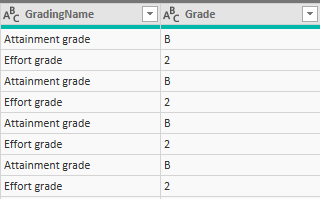
I want my data below to display two columns, one for Attainment grade and another for Effort grade so that I can treat them as independent data types. Any suggestions on how best to achieve this? The only thing I can come up with is to copy the huge table (there are over 20 columns) two times, filter one to display "Attainment grade" and the other to display "Effort grade" only in the query editor and then join them via a relationship, this feels really messy, so I want a better approach to this.
Current state of data
Solved! Go to Solution.
hi,
you can use "Pivot" transformation in Power Query.
Here is the PBI file.
hi,
you can use "Pivot" transformation in Power Query.
Here is the PBI file.
Thank you that is great! I am curious why did you bother with adding the index column?
Don't miss out on Data Days, June 15 through August 7. Learn Fabric, Power BI, SQL, AI and more.
Check out the May 2026 Power BI update to learn about new features.
| User | Count |
|---|---|
| 24 | |
| 22 | |
| 20 | |
| 20 | |
| 12 |
| User | Count |
|---|---|
| 66 | |
| 55 | |
| 42 | |
| 38 | |
| 30 |