Share feedback directly with Fabric product managers, participate in targeted research studies and influence the Fabric roadmap.
Sign up nowGet Fabric certified for FREE! Don't miss your chance! Learn more
Hi all,
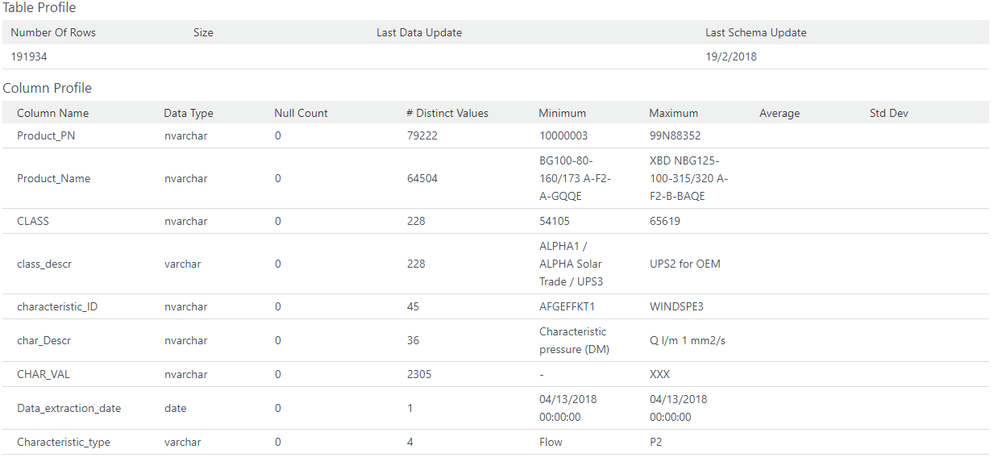
I want to profile every single data table I have in my powerbi report. By data profile I mean somehting like this:
are there ways to make a data profile view in powerbi? dax measure or calculated columns?
alternatively, you can also recommend other data quality tools that can handle such tasks since I find it bit difficult to achieve this result in powerbi.
As far as I know, there is no elegant way. You may try Table functions.
HI,
could you please provide some examples on how to do with table functions in DAX?
Try the table Profile command.
Add a step based on the previous step or use the advanced editor
= Table.Profile(Source )
https://msdn.microsoft.com/en-us/query-bi/m/table-profile
https://blog.crossjoin.co.uk/2016/01/12/descriptive-statistics-in-power-bim-with-table-profile/
If you love stickers, then you will definitely want to check out our Community Sticker Challenge!
Check out the January 2026 Power BI update to learn about new features.
| User | Count |
|---|---|
| 63 | |
| 58 | |
| 46 | |
| 21 | |
| 18 |
| User | Count |
|---|---|
| 119 | |
| 116 | |
| 37 | |
| 34 | |
| 30 |