Join us at FabCon Atlanta from March 16 - 20, 2026, for the ultimate Fabric, Power BI, AI and SQL community-led event. Save $200 with code FABCOMM.
Register now!The Power BI Data Visualization World Championships is back! Get ahead of the game and start preparing now! Learn more
I have a pretty simple visual set up.. all my tables are Direct Query.
I can describe my model if need be.. but wondering if anyone has seen this issue..
When I display the report, the visualization only shows a subset of the data (1 row). I know that is not accurate. I simply click on the visualization and it refreshes itself to show the correct results.
I can reproduce this by clicking on another visualization, and then clicking back..
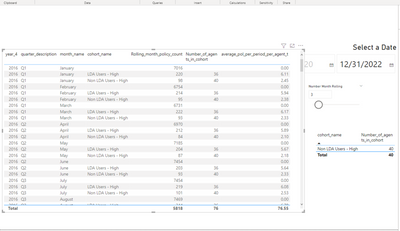
Here it is initially (or by clicking the visualiation on the left). Note only 1 row for the right hand side.
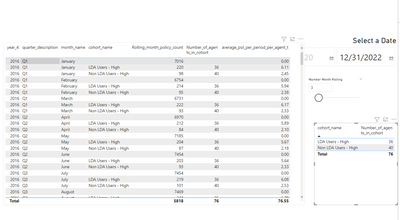
Then I do nothing but click on the visualization on the right (note the second row added):
Common issue?
Thanks
Solved! Go to Solution.
HI @rsderidd ,
I see a differemce between your 1st screenshot and 2nd screenshot.
In your 1st screenshot you have definitely selected something by mistake whihc is making your right visual display only 1 row.
Once you click outside or anywhere else, the selection on left visual clears and more rows display on the right visual.
This is a default interaction behaviour in Power BI.
Try adding a TITLE on the left visual and try to replicate same steps again by clicking the title on the left visual rather than clicking somewhere else on this visual.
I am very much sure you will understand the difference.
ok thanks.. i didn't realize that clicking on the other visualization's records would actually filter on other ones!
HI @rsderidd ,
I see a differemce between your 1st screenshot and 2nd screenshot.
In your 1st screenshot you have definitely selected something by mistake whihc is making your right visual display only 1 row.
Once you click outside or anywhere else, the selection on left visual clears and more rows display on the right visual.
This is a default interaction behaviour in Power BI.
Try adding a TITLE on the left visual and try to replicate same steps again by clicking the title on the left visual rather than clicking somewhere else on this visual.
I am very much sure you will understand the difference.
The Power BI Data Visualization World Championships is back! Get ahead of the game and start preparing now!
| User | Count |
|---|---|
| 37 | |
| 37 | |
| 33 | |
| 32 | |
| 29 |
| User | Count |
|---|---|
| 130 | |
| 88 | |
| 82 | |
| 68 | |
| 64 |