Join us at FabCon Atlanta from March 16 - 20, 2026, for the ultimate Fabric, Power BI, AI and SQL community-led event. Save $200 with code FABCOMM.
Register now!Get Fabric Certified for FREE during Fabric Data Days. Don't miss your chance! Request now
Hi,
Data lables are not showing when the size of the bar is small in stacked column chart. Are there any alternative ways to show them?
I have the same issue. I have a stacked bar chart which is similar. I went through all the suggestions. Overflow text is on, font is smallest available, I don't see any label density as well.
Try Options--> Inside end/ Outside end under data labels
Hi @bml123 ,
Data labels may not show relatively "small" values.
You can try reducing the font size to see if any other labels show up.
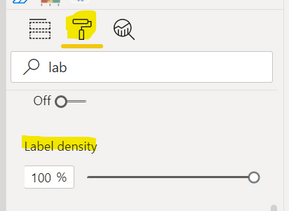
Or in Format -- Data lables -- label density -- adjust it to 100%.
Also try to make the visual bigger by increasing the height.
Best Regards,
Liu Yang
If this post helps, then please consider Accept it as the solution to help the other members find it more quickly.
Hi @Anonymous
I cannot see label density. Do we not see label density for stacked column chart?
Hi @bml123
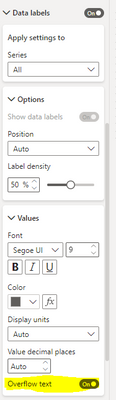
Try to turn on the "OVERFLOW TEXT" this will try to show you the value if the column is small
i have same issue. but i dont see either overflow text or label density. Is there any other way out??
Check out the November 2025 Power BI update to learn about new features.
Advance your Data & AI career with 50 days of live learning, contests, hands-on challenges, study groups & certifications and more!