cancel
Showing results for 
Search instead for 
Did you mean: 

The Power BI Data Visualization World Championships is back! Get ahead of the game and start preparing now! Learn more

Reply
benbtrading
New Member

Data export incomplete - missing rows

Dear,


I've setup a full working Power Bi dashboard using the desktop software.


I've tried to export some of the data today but it is missing some rows in the exported file.

It is supposed to show 4094 rows but i am only able to export 3173 rows.


I've tried changing the filters to get the data.

The relationships have been checked without any error found.


At the moment i am stuck and i cannot find any solution when i am searching in the forums.


I little help would be appreciated!


Thanks,


Benjamin Kuijs


1 ACCEPTED SOLUTION
TomMartens
Super User
Super User

Hey,


maybe this will help

https://powerbi.microsoft.com/en-us/documentation/powerbi-service-export-data/#limitations-and-consi...


This document describes some considerations that you may take into account.


And also you have to consider, that the table automatically aggregates some data and basically suppresses rows that have no data.


For this reason you may have to tweak your table visualization a little

  • Show items with no data
    Show items with no data.png
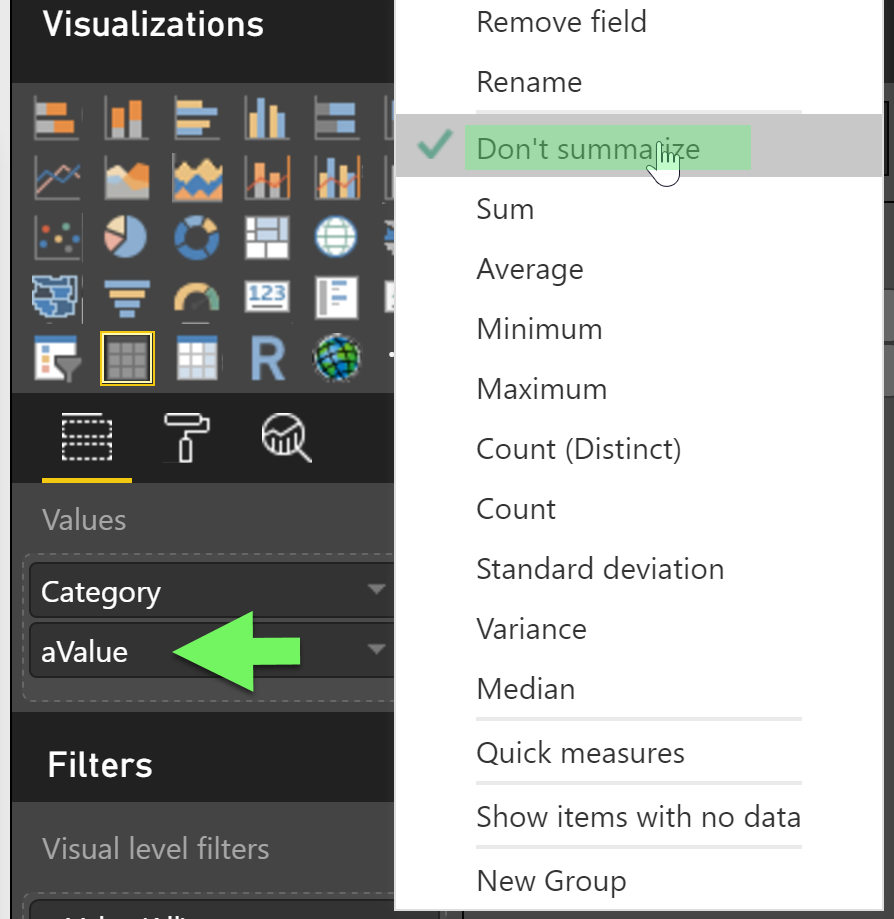
  • Don't summarize the measure
    Do not summarize.png

Here is a very small example


Hope this helps


Did I answer your question? Mark my post as a solution, this will help others!

Proud to be a Super User!
I accept Kudos 😉
Hamburg, Germany

View solution in original post

1 REPLY 1
TomMartens
Super User
Super User

Hey,


maybe this will help

https://powerbi.microsoft.com/en-us/documentation/powerbi-service-export-data/#limitations-and-consi...


This document describes some considerations that you may take into account.


And also you have to consider, that the table automatically aggregates some data and basically suppresses rows that have no data.


For this reason you may have to tweak your table visualization a little

  • Show items with no data
    Show items with no data.png
  • Don't summarize the measure
    Do not summarize.png

Here is a very small example


Hope this helps


Did I answer your question? Mark my post as a solution, this will help others!

Proud to be a Super User!
I accept Kudos 😉
Hamburg, Germany

Helpful resources

Announcements
Power BI DataViz World Championships

Power BI Dataviz World Championships

The Power BI Data Visualization World Championships is back! Get ahead of the game and start preparing now!

November Power BI Update Carousel

Power BI Monthly Update - November 2025

Check out the November 2025 Power BI update to learn about new features.

FabCon Atlanta 2026 carousel

FabCon Atlanta 2026

Join us at FabCon Atlanta, March 16-20, for the ultimate Fabric, Power BI, AI and SQL community-led event. Save $200 with code FABCOMM.