cancel
Showing results for 
Search instead for 
Did you mean: 

Did you hear? There's a new SQL AI Developer certification (DP-800). Start preparing now and be one of the first to get certified. Register now

Reply
Anonymous
Not applicable

Data credentials cannot be altered

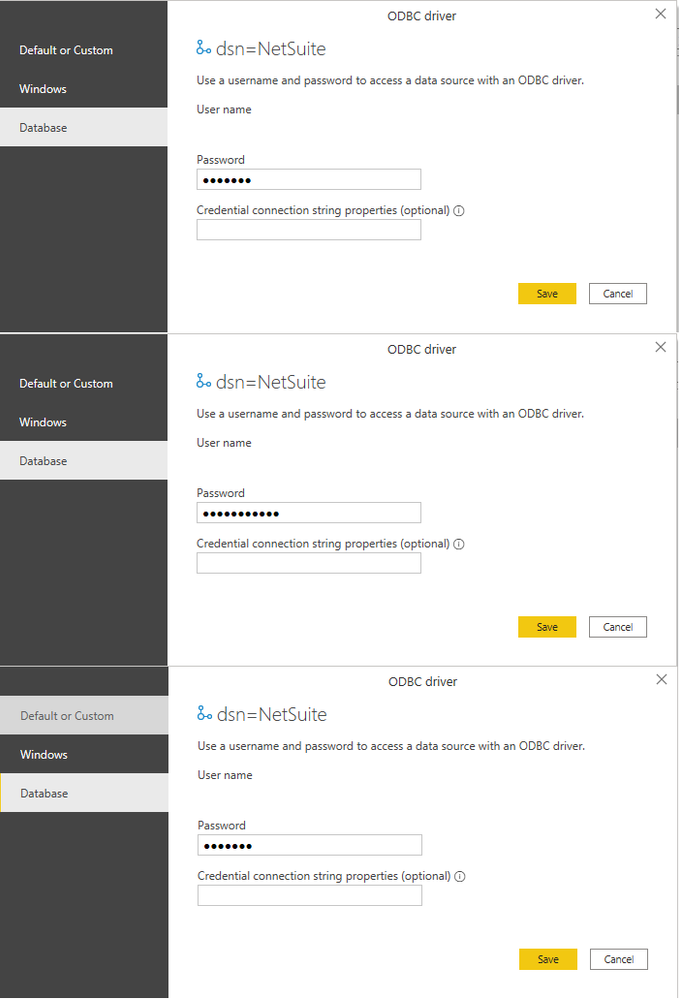
I am connecting to a Netsuite source using an ODBC connector.  My password has changed as per corporate policy.  I updated my password in the data source settings, but on return later, the password was the length of my previous password.  Suspecting I hadn't saved the change, I re-entered them, but discovered that even though I was hitting save on the source settings, when I opened them again they had reverted to the old password.  Changing to the Windows, "alternate username and password" option  saves the same length incorrect password!


Power BI Desktop is able to access the source without error, but when publishing to Power BI Service, scheduled refresh is unavailable because of data credentials missing.  Commonly the solution to that is to install a data gateway, but that doesn't make  sense in this instance.  Can anyone tell what is happening?


Screenshots on first opening settings, after altering the password before I (definitely) saved them, and on reopening settings:


credentials error.png

1 ACCEPTED SOLUTION
tex628
Community Champion
Community Champion

Hi @Anonymous ,

Have you tried changing the credentials directly in Power BI Service? 

Navigate to the dataset and then into settings. There you will have the ability to change the credentials. 

/ J


Connect on LinkedIn

View solution in original post

3 REPLIES 3
tex628
Community Champion
Community Champion

Hi @Anonymous ,

Have you tried changing the credentials directly in Power BI Service? 

Navigate to the dataset and then into settings. There you will have the ability to change the credentials. 

/ J


Connect on LinkedIn
Anonymous
Not applicable

The datasource required a data gateway.  However, the data credential settings could still not be changed in Power BI Desktop, but they could in Power BI Service.  I still kind of consider this a workaround, but that's more the problem of the ERP, and your answer was really helpful, thanks.

Anonymous
Not applicable

hi @tex628 ,


The credential options on Power BI Service are completely greyed out.

Helpful resources

Announcements
April Power BI Update Carousel

Power BI Monthly Update - April 2026

Check out the April 2026 Power BI update to learn about new features.

Fabric SQL PBI Data Days

Data Days 2026 coming soon!

Sign up to receive a private message when registration opens and key events begin.

New to Fabric survey Carousel

New to Fabric Survey

If you have recently started exploring Fabric, we'd love to hear how it's going. Your feedback can help with product improvements.

Power BI DataViz World Championships carousel

Power BI DataViz World Championships - June 2026

A new Power BI DataViz World Championship is coming this June! Don't miss out on submitting your entry.