
cancel
Showing results for 
Search instead for 
Did you mean: 

Learn from the best! Meet the four finalists headed to the FINALS of the Power BI Dataviz World Championships! Register now

Reply
evalromf
Helper I
Helper I

Data aggregation - not rolling

Hi,


I am creating a report with data that spans one year. However, the data comes in with 6 values per day. The data is fluctuacting much, so the grahps get almost unreadable.


I can display monthly data, as I have two columns coming in (using three different SQL-questions when retrieving data from a database, aggregated by hour / day / month). However, monthly data is not useful in all tables, as it is too aggreated.


I have added the week of the month and grouped the data using this column - but the, it's the week of the year that gets displayed in the X-axis (and that is not really user-friendly).


It does not necessarily have to be per-week, just aggregated a bit more. 5 days together would be sufficient as well. I'd not like to have a rolling average, but an average over a number of of days that is somewhere between hourly and monthly.


Is there someone that has a solution for this? It would be really appreciated.


//Eva-Lotta

2 REPLIES 2
Anonymous
Not applicable

Hi @evalromf


PLease post some sample data and the exact output expected.


Cheers


CheenuSing

Hi,


As you can see in the picture below, the graps are very difficult to interpret:


Capture.JPG


The source data (dummy values) looks like this:


dummy data.JPG


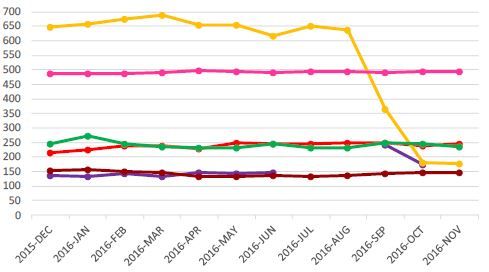
When taking the monthly averages, it looks something like this (not the same data, just an example):


Capture 2.JPG


This data is taken from a file that is structured the same way, but it contains data per-month.


So what I'd like to have, is something in between. Would that be possible? I'd like to avoid formatting / aggregating the data too much before loading it into Power BI.


//Eva-Lotta


Helpful resources

Announcements
New to Fabric survey Carousel

New to Fabric Survey

If you have recently started exploring Fabric, we'd love to hear how it's going. Your feedback can help with product improvements.

Power BI DataViz World Championships carousel

Power BI DataViz World Championships - June 2026

A new Power BI DataViz World Championship is coming this June! Don't miss out on submitting your entry.

Join our Fabric User Panel

Join our Fabric User Panel

Share feedback directly with Fabric product managers, participate in targeted research studies and influence the Fabric roadmap.

March Power BI Update Carousel

Power BI Community Update - March 2026

Check out the March 2026 Power BI update to learn about new features.