Don't miss your chance to take the Fabric Data Engineer (DP-600) exam for FREE! Find out how by attending the DP-600 session on April 23rd (pacific time), live or on-demand.
Learn moreNext up in the FabCon + SQLCon recap series: The roadmap for Microsoft SQL and Maximizing Developer experiences in Fabric. All sessions are available on-demand after the live show. Register now
I'm having a weird issue with data types. All data types are missing in my report and data view, but they are showing up in the model view. The result is that I can't use aggregates in all of my reports.
It used to work; I have visualizations with aggregates that still display fine. But when I recreate the same visual in the same report (or even add the same field to the existing visual), the data can only be shown as not aggregated.
In the model view, the fields are of the correct type (Decimal number, for example).
I figured it might have something to do with a relationship somewhere, so I deleted all relationships for the table in the example, but that didn't fix the problem.
I'm at a loss. Am I missing something obvious?
If I create a new Data set from scratch with the same data, it works just fine (I import data from an SQL database). But that's A LOT of work of recreating measures and stuff to fix this seemingly simple issue.
Hope someone can help.
For extra context, some screenshots of what I'm seeing
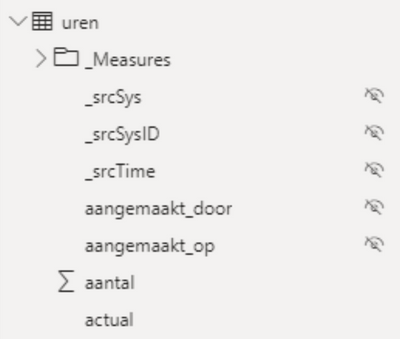
An example of one of the fields in model view (The 'aantal' field):
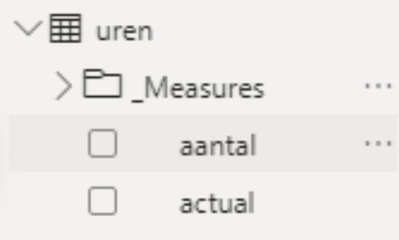
In Data view:

And in the Report view:
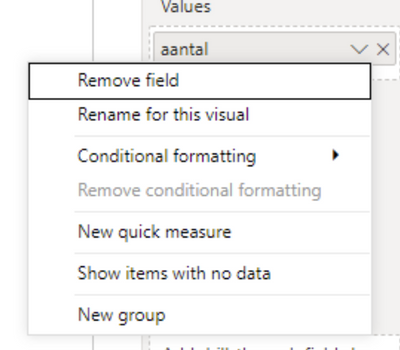
These are the options when I add the field to a table:
Solved! Go to Solution.
If you are using Calculation Groups, the aggregations are disabled by default. Check the following thread:
https://community.powerbi.com/t5/Desktop/Tabular-Editor-Calculation-groups/m-p/1283596#M561212
Proud to be a Super User!
Paul on Linkedin.
If you are using Calculation Groups, the aggregations are disabled by default. Check the following thread:
https://community.powerbi.com/t5/Desktop/Tabular-Editor-Calculation-groups/m-p/1283596#M561212
Proud to be a Super User!
Paul on Linkedin.
Oh my God, that's it @PaulDBrown!
I was totally unaware of this implication when I started using calculated groups some time ago. I didn't do my research apparently. Never made the connection, hence the reason I couldn't find anything in this community or anywhere else online. I wasn't using the right keywords!
Thanks for letting me know. I guess I'm making explicit measures for simple aggregations in the future.
Not sure what I am missing here - this field is a column with implicit aggregation, not a measure?
I don't think you're missing anything. That's exactly right. I used to be able to aggregate/summarize those columns. But not anymore. I just learned from @PaulDBrown that this is because of the calculation groups I use.
But I have the feeling your reply implies something I overlooked on my end. Although I understand the reason for my issue now, I'd still love to learn more about stuff I might have overlooked.
If you have recently started exploring Fabric, we'd love to hear how it's going. Your feedback can help with product improvements.
A new Power BI DataViz World Championship is coming this June! Don't miss out on submitting your entry.
| User | Count |
|---|---|
| 46 | |
| 43 | |
| 39 | |
| 19 | |
| 15 |
| User | Count |
|---|---|
| 68 | |
| 67 | |
| 31 | |
| 27 | |
| 24 |