cancel
Showing results for 
Search instead for 
Did you mean: 

Learn from the best! Meet the four finalists headed to the FINALS of the Power BI Dataviz World Championships! Register now

Reply
PowerBiNewbie2
New Member

Data Transformation and PowerBI/PowerQuery

Hello All,

I've been researching and looking for ways to do this transform with no luck. Being new to PowerBi and PowerQuery any help/hints will be greatly appreciated.

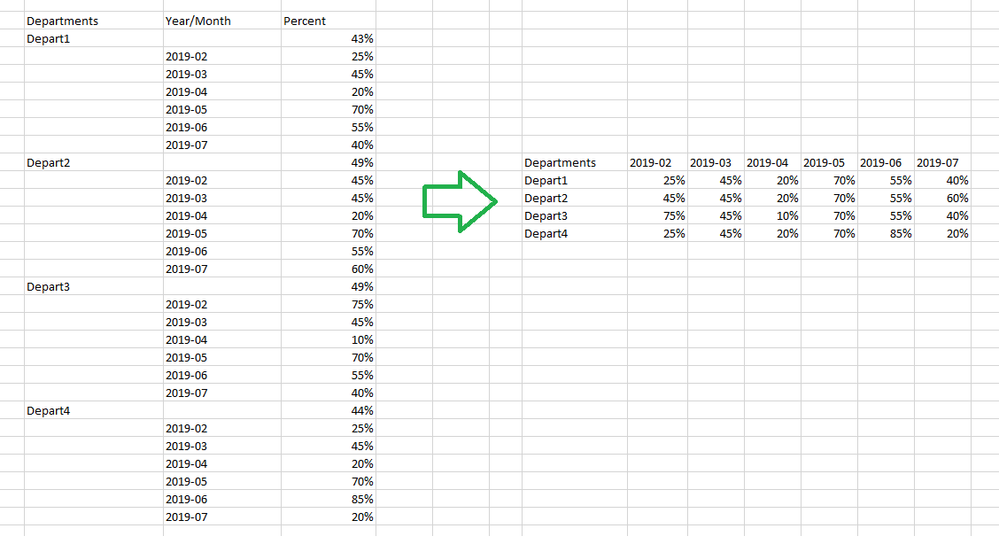
The percent next to the blank Year/Month field is the average of the percents from the six month time span. It is not needed. (if that helps)

Is the following possible within PowerQuery? 
Outside data source report output on the left.
What I need to create dashboard reports on right.
TransforIssue.png

Thanks!

1 ACCEPTED SOLUTION
Stachu
Community Champion
Community Champion

Do the following:

1) Right click on the Departments colum , click Fill=>Down

2) Filter out blanks from Year/Month


I would actually stop here and keep the 3 column layout - with it you can achieve the view you want using the Matrix visual, plus it's much easier to manage with time hierarchy etc (you can actually do joins with a Calendar table, use time intelligence etc.) Still, if you really need that layout in PQ then


3) Pivot column Year/Month in the Transform ribbon


Did I answer your question? Mark my post as a solution!
Thank you for the kudos 🙂

View solution in original post

2 REPLIES 2
Stachu
Community Champion
Community Champion

Do the following:

1) Right click on the Departments colum , click Fill=>Down

2) Filter out blanks from Year/Month


I would actually stop here and keep the 3 column layout - with it you can achieve the view you want using the Matrix visual, plus it's much easier to manage with time hierarchy etc (you can actually do joins with a Calendar table, use time intelligence etc.) Still, if you really need that layout in PQ then


3) Pivot column Year/Month in the Transform ribbon


Did I answer your question? Mark my post as a solution!
Thank you for the kudos 🙂

Works great! It makes so much sense now. I was getting hung up on the Fill Down and blanks to null.

Thanks!

Helpful resources

Announcements
Power BI DataViz World Championships carousel

Power BI DataViz World Championships - June 2026

A new Power BI DataViz World Championship is coming this June! Don't miss out on submitting your entry.

Join our Fabric User Panel

Join our Fabric User Panel

Share feedback directly with Fabric product managers, participate in targeted research studies and influence the Fabric roadmap.

March Power BI Update Carousel

Power BI Community Update - March 2026

Check out the March 2026 Power BI update to learn about new features.