cancel
Showing results for 
Search instead for 
Did you mean: 

Data Days is here! Join us now for 60+ days of learning, challenges, and connection. Learn more

Reply
usamajadi
Regular Visitor

Data Source Settings

Hello Everyone
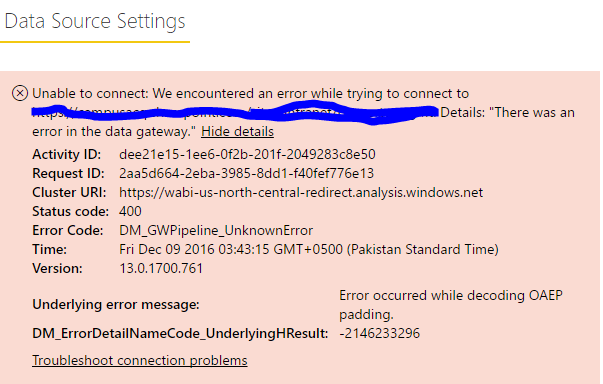
i was succesfully installed on premises data gateway now i want to add my data source but when i enter all the details and credentials it shows me error. shown in the figure.
ErrorError
my data source is from SharePoint List using Office 365 account.
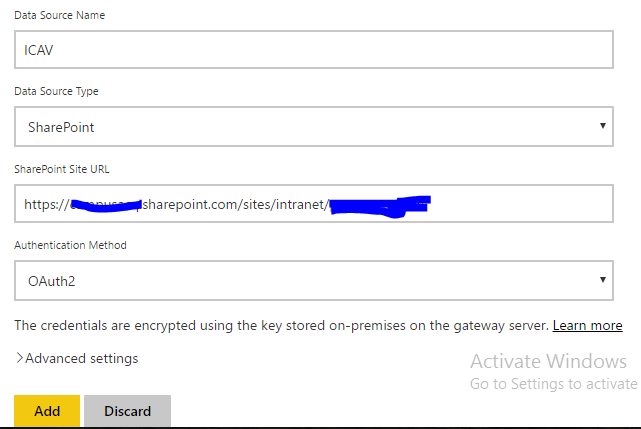
Details for Adding Data Source. Please show in the figure below

Details.PNG


if you know about this error or any thing in your knownledge please let me know i am very thank ful to you.


1 ACCEPTED SOLUTION

Hi @usamajadi,


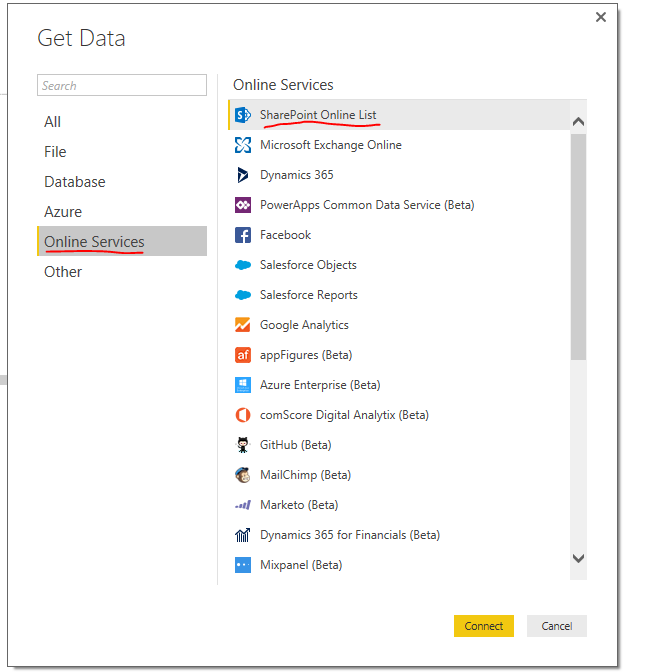
SharePoint Online is an online service which Power BI could connect directly, there is no need to add SharePoint Online as a data source under On-Premise data gateway.

"

The on-premises data gateway acts as a bridge, providing quick and secure data transfer between on-premises data (data that is not in the cloud) and the Power BI, Microsoft Flow, Logic Apps, and PowerApps services.

"

More information, please see: On-premises data gateway

27.PNG

If you have any other issues when work with SharePoint online, then please post back.

Regards


View solution in original post

5 REPLIES 5
rafaeldeon
New Member

FULL REMOVE GATEWAY PART IN CONTROL PANEL, REINSTALL AND DONE....

v-micsh-msft
Microsoft Employee
Microsoft Employee

Hi usamahadi,


Would you please share more details about the SharePoint List using Office 365 account, is this SharePoint Online list?

Power BI could connect to online services directly, there is no need to add the SharePoint Online as a data source under on premises data gateway.


If for on premises SharePoint site, try to change the authentication type to Windows, and enter the corresponding User Name and Password.


The error message "Error occurred while decoding OAEP padding" indicates there are issues under the gateway, we may need to check the gateway logs first.

Please follow the guide below regarding Gateway troubleshooting:

Troubleshooting the On-Premises Data Gateway

Hope the information above would be helpful.

Regards

@v-micsh-msft Thankyou for reply
Yes, i am using SharePoint online List using office 365 account organizational account.

when i was change my authentication method and given windows username and password 
then it shows me error please see the error screenshot below
Error.PNG

if you have any solution for this. i will be very thankful to you

Hi @usamajadi,


SharePoint Online is an online service which Power BI could connect directly, there is no need to add SharePoint Online as a data source under On-Premise data gateway.

"

The on-premises data gateway acts as a bridge, providing quick and secure data transfer between on-premises data (data that is not in the cloud) and the Power BI, Microsoft Flow, Logic Apps, and PowerApps services.

"

More information, please see: On-premises data gateway

27.PNG

If you have any other issues when work with SharePoint online, then please post back.

Regards


Hi @v-micsh-msft


issue is resolved now.

Thankyou so much for replying and shared you knowledge and experience with me and viewers.


Regards,
Muhammad Usama Jadi

Helpful resources

Announcements
Fabric Data Days is here Carousel

Fabric Data Days 2026

Don't miss out on Data Days, June 15 through August 7. Learn Fabric, Power BI, SQL, AI and more.

May Power BI Update Carousel

Power BI Monthly Update - May 2026

Check out the May 2026 Power BI update to learn about new features.

Power BI DataViz World Championships carousel

Power BI DataViz World Championships - June 2026

A new Power BI DataViz World Championship is coming this June! Don't miss out on submitting your entry.