cancel
Showing results for 
Search instead for 
Did you mean: 

Get Fabric certified for FREE! Don't miss your chance! Learn more

Reply
brysonb12
Frequent Visitor

Data Slicer Filtering

Hello All - Need some HELP!!!!!


What I have is two spreadsheets

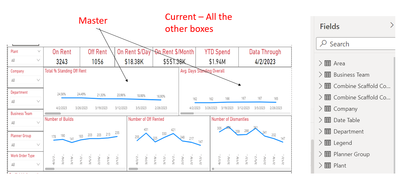
1. Master - Holds multple weeks of data

2. Current - Is a copy of the (Master) but have set a filter to it to just show me the data from the most current week ending date.


I have a sheet that has multiple charts on it. Most of the charts are based on the "Current" table. But there are also some charts that are based on the Master table.


I have included multiple slicers to sort through data. (Company, Department, Area, Team)


What I am trying to do is when I select Company, i want the Department slicer to filter only based on the data that is there, and the charts to reflect the selection. 


The issue is when I apply the Comapny from the Current table it only chnages those graphs (Current) and vise vera for the Master. 


I haver also created a "Company" table of its own, and then linked "Company" to both the Master file and Current. That dont work either......


Looking for suggestions! 

5 REPLIES 5
brysonb12
Frequent Visitor

brysonb12_0-1680880365740.png


Hello,


this is not the model

it should contain the tables and the relations 


Regards 

CharbelArmaleh
Resolver II
Resolver II

Hello

can you show us the model ?

Hopefully someone can help fix!!! Not sure why its not filtering the data.

brysonb12_0-1681142609608.png


Helpful resources

Announcements
Join our Fabric User Panel

Join our Fabric User Panel

Share feedback directly with Fabric product managers, participate in targeted research studies and influence the Fabric roadmap.

FabCon Atlanta 2026 carousel

FabCon Atlanta 2026

Join us at FabCon Atlanta, March 16-20, for the ultimate Fabric, Power BI, AI and SQL community-led event. Save $200 with code FABCOMM.