cancel
Showing results for 
Search instead for 
Did you mean: 

Learn from the best! Meet the four finalists headed to the FINALS of the Power BI Dataviz World Championships! Register now

Reply
Anonymous
Not applicable

Data Showing in Incorrect Month?

Hi All,


I have imported the PowerBi table that was links to an excel file  into a sharepoint list to create a better user experience.


However my charts are not out by one month...


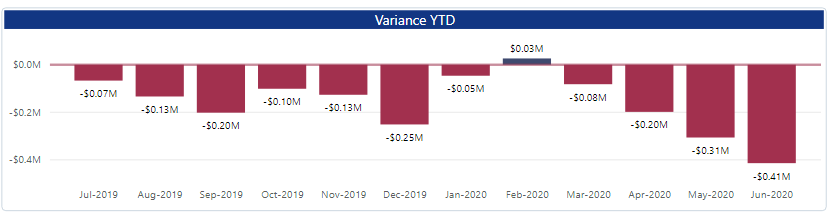
I get this in the new Sharepoint List- All the data needs to be moved to the right by one month.


YTD1.PNG


Than you in advance for your help!


cheers,

Peter

4 REPLIES 4
Anonymous
Not applicable

Sorry- I ment to say all my charts are out by one month. 


e.g., Feb is showing are Jan, March is showing as Feb etc...


Regards,

Peter

@Anonymous , Problem with Calendar. Create correct calendar

Share with Power BI Enthusiasts: Full Power BI Video (20 Hours) YouTube
Microsoft Fabric Series 60+ Videos YouTube
Microsoft Fabric Hindi End to End YouTube
amitchandak
Super User
Super User

@Anonymous , Not very clear, Can you share sample data and sample output.

Your date that is joining with date table may have timestamp. In that case remove timestamp

New DATE =[timestamp].date
or
New DATE =date(year([timestamp]),month([timestamp]),day([timestamp]))

Share with Power BI Enthusiasts: Full Power BI Video (20 Hours) YouTube
Microsoft Fabric Series 60+ Videos YouTube
Microsoft Fabric Hindi End to End YouTube
parry2k
Super User
Super User

@Anonymous not sue I fully followed your question, did you check the data and check if date value is correct? What measures are you using? Maybe there is something in the calculation, without seeing the sample data and also the measure (if used), it is hard to say what is going on. 


Subscribe to the @PowerBIHowTo YT channel for an upcoming video on List and Record functions in Power Query!!

Learn Power BI and Fabric - subscribe to our YT channel - Click here: @PowerBIHowTo

If my solution proved useful, I'd be delighted to receive Kudos. When you put effort into asking a question, it's equally thoughtful to acknowledge and give Kudos to the individual who helped you solve the problem. It's a small gesture that shows appreciation and encouragement! ❤


Did I answer your question? Mark my post as a solution. Proud to be a Super User! Appreciate your Kudos 🙂
Feel free to email me with any of your BI needs.

Helpful resources

Announcements
New to Fabric survey Carousel

New to Fabric Survey

If you have recently started exploring Fabric, we'd love to hear how it's going. Your feedback can help with product improvements.

Power BI DataViz World Championships carousel

Power BI DataViz World Championships - June 2026

A new Power BI DataViz World Championship is coming this June! Don't miss out on submitting your entry.

Join our Fabric User Panel

Join our Fabric User Panel

Share feedback directly with Fabric product managers, participate in targeted research studies and influence the Fabric roadmap.

March Power BI Update Carousel

Power BI Community Update - March 2026

Check out the March 2026 Power BI update to learn about new features.