This is best Fabric, Power BI, SQL and AI community event. How do we know? The last event sold out! Save €200 with code FABCMTY200.
Register nowA new Data Days event is coming soon! This time we’re going bigger than ever. Fabric, Power BI, SQL, AI and more. Don't miss out.
Hello!
I am working with an example database that in the fact table has a date column with years 1900, 1901 and 1902. How can I change the years of this date column to other years (for example 2005,2006 and 2007) in the Query Editor, maintaining the day and the month?
Solved! Go to Solution.
Hi @Anonymous ,
This is my test table:
Please change data type from “Date” to “Text”.
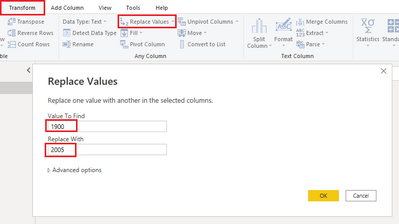
Select Transform tab – Replace Values, enter the value you want to find and replace with.
Then you can change the year and maintain the day and the month.
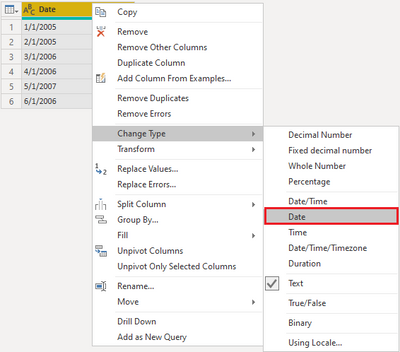
Last, please remember to change data type from text to date.
Best regards,
Yadong Fang
If this post helps, then please consider Accept it as the solution to help the other members find it more quickly.
Hi @Anonymous ,
This is my test table:
Please change data type from “Date” to “Text”.
Select Transform tab – Replace Values, enter the value you want to find and replace with.
Then you can change the year and maintain the day and the month.
Last, please remember to change data type from text to date.
Best regards,
Yadong Fang
If this post helps, then please consider Accept it as the solution to help the other members find it more quickly.
Thank you very much for the detailed solution.
Sign up to receive a private message when registration opens and key events begin.
If you have recently started exploring Fabric, we'd love to hear how it's going. Your feedback can help with product improvements.
| User | Count |
|---|---|
| 33 | |
| 25 | |
| 23 | |
| 20 | |
| 15 |
| User | Count |
|---|---|
| 64 | |
| 41 | |
| 27 | |
| 22 | |
| 22 |