cancel
Showing results for 
Search instead for 
Did you mean: 

The Power BI Data Visualization World Championships is back! It's time to submit your entry. Live now!

Reply
mbd
Helper I
Helper I

Data Refresh Problem

I have a report that is pulling data from a server.  New data has been added. I have refreshed my report but the data is not showing up in the report. I can see the updated data when I go into Edit Queries and look at the query for that report. So I know it's getting this far. Any ideas?


thanks

7 REPLIES 7
v-huizhn-msft
Microsoft Employee
Microsoft Employee

Hi @mbd,

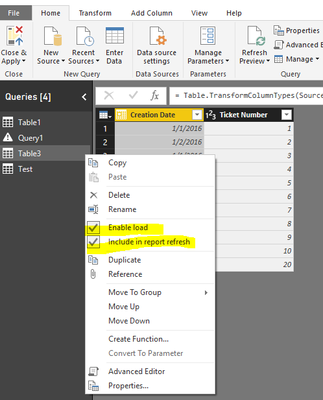
In Query Editor, please your query if you disable the "Enable Load" and "Include In Report Refresh." If you have, please enable it.

1.PNG


"Include In Report Refresh" means query is automatically refreshed when you press "Refresh" button on the ribbon. "Enable Load" means query results are available for report builder. Otherwise you may use it in your other queries (for example to merge data), but it is not shown in the report builder.

Best Regards,
Angelia

Hi Angelia, 


This answer did not resolve my problem. "Enable Load" and "Include In Report Refresh" were already enabled. On one of my reports the data was updated with the new information after I hit refresh. But on three of my reports it was not updated, even though "Enable Load" and "Include In Report Refresh" were enabled.


mbd

Hi @mbd,

I totally understand you. But I can't reproduce your issue. Please update your Power Bi desktop to latest version and check if it works fine.

Best Regards,
Angelia 

I'm already running the latest version

Hi @mbd,

I personally suggest you create a support ticket on the right bottom of page for better assistanceSmiley Happy. Please use fiddler to trace log when you refresh and share the log file when you create the support ticket.

Best Regards,
Angelia

Hi Angelia, 


I will submit a support ticket. 

I'm getting another error when refreshing my data it says "OLE DB or ODBC error: Exception from HRESULT: 0x80040E4E" Is there documentation so I can look up what that error is, or do you know what it means?

Hi Angelia, 


Both Enable Load and Include In Report Refresh were already enabled. 


Thanks

mbd

Helpful resources

Announcements
Power BI DataViz World Championships

Power BI Dataviz World Championships

The Power BI Data Visualization World Championships is back! It's time to submit your entry.

December 2025 Power BI Update Carousel

Power BI Monthly Update - December 2025

Check out the December 2025 Power BI Holiday Recap!

FabCon Atlanta 2026 carousel

FabCon Atlanta 2026

Join us at FabCon Atlanta, March 16-20, for the ultimate Fabric, Power BI, AI and SQL community-led event. Save $200 with code FABCOMM.