This time we’re going bigger than ever. Fabric, Power BI, SQL, AI and more. We're covering it all. You won't want to miss it.
Learn moreDid you hear? There's a new SQL AI Developer certification (DP-800). Start preparing now and be one of the first to get certified. Register now
Hello,
I alterd one of my SQL tables and when into Power BI desktop to build a new dashboard. However, when I try to load the data the preview still shows the old table structure. I've tried refreshing the database, closing and reopening PBI, and restarting the computer, but nothing works. Any help would be appreciated.
Tony
Hi Tony,
Could you please mark the proper answer as solution or share the answer if it's convenient for you? That will be a help to the others.
Best Regards!
Dale
Hi Tony,
According to my test, the preview was refreshed at the same time. Could you please check these things below?
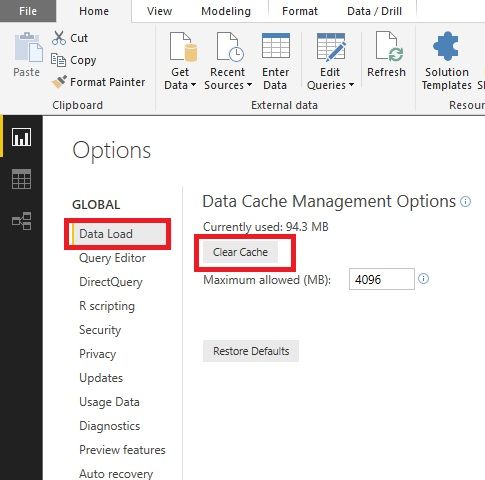
1. Clear the cache. Options -> Data load -> Clear Cache.
2. Make sure you connected the table you had made changes.
3. How about the data in the Query Editor? Load it anyway, ignore the preview.
4. Did you use Sql Server?
Best Regards!
Dale
Check out the April 2026 Power BI update to learn about new features.
Sign up to receive a private message when registration opens and key events begin.
If you have recently started exploring Fabric, we'd love to hear how it's going. Your feedback can help with product improvements.
| User | Count |
|---|---|
| 34 | |
| 31 | |
| 25 | |
| 20 | |
| 16 |
| User | Count |
|---|---|
| 60 | |
| 48 | |
| 29 | |
| 23 | |
| 23 |