Join us at FabCon Atlanta from March 16 - 20, 2026, for the ultimate Fabric, Power BI, AI and SQL community-led event. Save $200 with code FABCOMM.
Register now!The Power BI Data Visualization World Championships is back! Get ahead of the game and start preparing now! Learn more
Helo experts,
Need to pivot data like below
Please help
| No | Name | Type |
| 100, 101, 102 | Apple | Fruit |
| 200, 201, 202 | Onion | Veg |
| No | Name | Type |
| 100 | Apple | Fruit |
| 101 | Apple | Fruit |
| 102 | Apple | Fruit |
| 200 | Onion | Veg |
| 201 | Onion | Veg |
| 202 | Onion | Veg |
Solved! Go to Solution.
Hello @Anonymous
do the following :
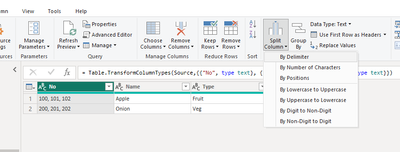
step1 : select the column to expand to rows and click on spit columns --> by delimiter,
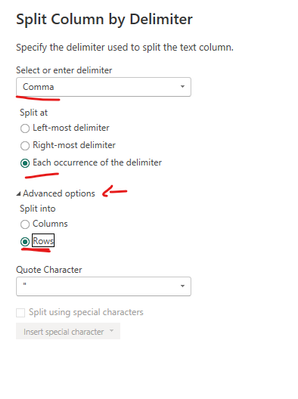
step 2 :
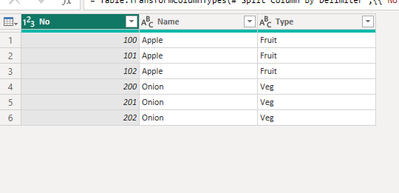
hit enter.
f my answer helped sort things out for you, i would appreciate a thumbs up 👍 and mark it as the solution !✅
It makes a difference and might help someone else too. Thanks for spreading the good vibes! 🤠
Hello @Anonymous
do the following :
step1 : select the column to expand to rows and click on spit columns --> by delimiter,
step 2 :
hit enter.
f my answer helped sort things out for you, i would appreciate a thumbs up 👍 and mark it as the solution !✅
It makes a difference and might help someone else too. Thanks for spreading the good vibes! 🤠
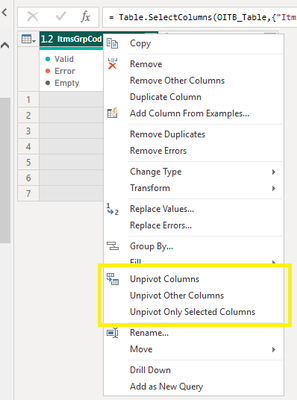
Hi, judging by your data, you should first split the first column by the ", " in order to create separate columns with numbers. Next you can play with pivot/unpivot columns/other columns.
Kudos and mark as solution appreciated 🙂
The Power BI Data Visualization World Championships is back! Get ahead of the game and start preparing now!
| User | Count |
|---|---|
| 40 | |
| 35 | |
| 34 | |
| 31 | |
| 28 |
| User | Count |
|---|---|
| 137 | |
| 102 | |
| 71 | |
| 67 | |
| 65 |