cancel
Showing results for 
Search instead for 
Did you mean: 

Join the FabCon + SQLCon recap series. Up next: Power BI, Real-Time Intelligence, IQ and AI, and Data Factory take center stage. All sessions are available on-demand after the live show. Register now

Reply
Anonymous
Not applicable

Data Pivot help

Helo experts,
Need to pivot data like below
Please help

NoNameType
100, 101, 102AppleFruit
200, 201, 202OnionVeg


NoNameType
100AppleFruit
101AppleFruit
102AppleFruit
200OnionVeg
201OnionVeg
202OnionVeg
1 ACCEPTED SOLUTION
Daniel29195
Super User
Super User

Hello @Anonymous 


do the following : 

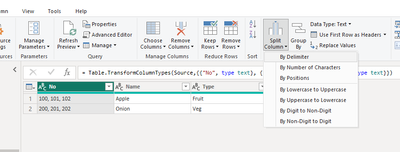
step1 :  select the column to expand to rows and click on spit columns -->  by delimiter,

Daniel29195_0-1706699888186.png


step 2 : 

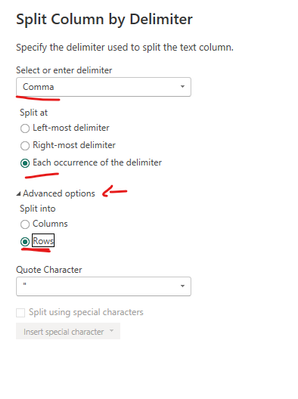
Daniel29195_1-1706699916435.png


hit enter. 

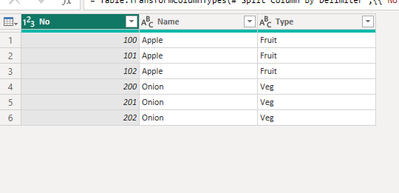
Daniel29195_2-1706699936584.png


f my answer helped sort things out for you, i would appreciate a thumbs up 👍 and mark it as the solution !
It makes a difference and might help someone else too. Thanks for spreading the good vibes! 🤠


View solution in original post

3 REPLIES 3
Daniel29195
Super User
Super User

Hello @Anonymous 


do the following : 

step1 :  select the column to expand to rows and click on spit columns -->  by delimiter,

Daniel29195_0-1706699888186.png


step 2 : 

Daniel29195_1-1706699916435.png


hit enter. 

Daniel29195_2-1706699936584.png


f my answer helped sort things out for you, i would appreciate a thumbs up 👍 and mark it as the solution !
It makes a difference and might help someone else too. Thanks for spreading the good vibes! 🤠


Anonymous
Not applicable

Missed advanced options. Thanks
zenisekd
Super User
Super User

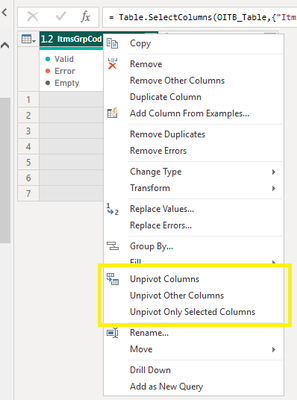
Hi, judging by your data, you should first split the first column by the ", " in order to create separate columns with numbers. Next you can play with pivot/unpivot columns/other columns. 

zenisekd_1-1706699864287.png

Kudos and mark as solution appreciated 🙂


Helpful resources

Announcements
April Power BI Update Carousel

Power BI Monthly Update - April 2026

Check out the April 2026 Power BI update to learn about new features.

New to Fabric survey Carousel

New to Fabric Survey

If you have recently started exploring Fabric, we'd love to hear how it's going. Your feedback can help with product improvements.

Power BI DataViz World Championships carousel

Power BI DataViz World Championships - June 2026

A new Power BI DataViz World Championship is coming this June! Don't miss out on submitting your entry.

FabCon and SQLCon Highlights Carousel

FabCon &SQLCon Highlights

Experience the highlights from FabCon & SQLCon, available live and on-demand starting April 14th.