cancel
Showing results for 
Search instead for 
Did you mean: 

The FabCon + SQLCon recap series starts April 14th at 8am Pacific. If you’re tracking where AI is going inside Fabric, this first session is a can't miss. Register now

Reply
Anonymous
Not applicable

Data Modelling Question for Changing Managers Intra-Year

Hi,


I am building a report that contains salespeople's sales, pipeline and quota data in one table. I also have 2 slicers for fiscal periods and each sales manager, so I can filter for each manager's team. This manager information is located in the hierarchy table which details who each salesperson's manager is for each fiscal period. These managers can change from one fiscal period to another. I'm struggling to create a data model that accounts for this changing manager per fiscal period. For example, Jim sold $16 in fiscal period 1 and $20 in fiscal period 2, for a total of $36. Jim's manager in fiscal period 1 was Ashley and his manager in fiscal period 2 was Chris. As is currently stands, when I filter for Ashley, all $36 of Jim's sales come up, when it should be only $16 because Ashley was only Jim's manager in fiscal period 1. 


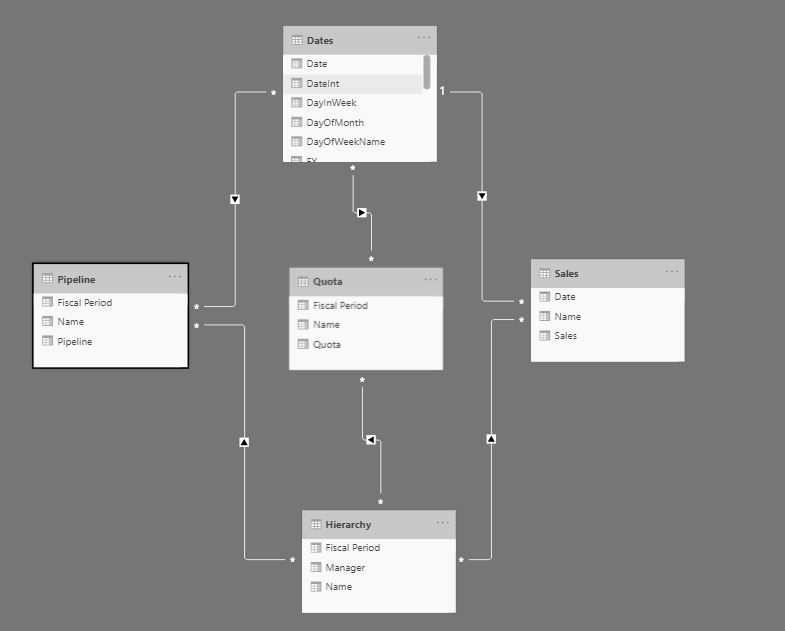
For reference, I have five tables in my data model:

  • Dates
  • Quota (quota information for each salesperson by fiscal period)
  • Pipeline (pipeline information for each salesperson by fiscal period)
  • Sales (sales information for each salesperson by date)
  • Hierarchy (employee/manager information for each salesperson by fiscal period)


I have included a screenshot of my data model below as well as sample report with my exact description. Please let me know if there's a better way for me to model my data. 


Sample Dashboard: https://www.dropbox.com/s/kvtoy7zrmns548n/8-12%20Sample.pbix?dl=0


Data_Model.JPG 


I would like this result to be $16 instead of $36.I would like this result to be $16 instead of $36.


1 ACCEPTED SOLUTION
Anonymous
Not applicable

Hi @Anonymous 

There are too many relationships between your tables, and it is not easy to get result just by building relationships.

You may achieve your goal by measure.

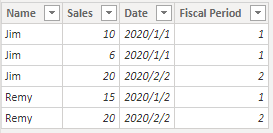
Add a Fiscal Period column to Sales table.

Result:
1.png

Then build measures to achieve your goal.

M_Sales = 
VAR _selectvalue =
    SELECTEDVALUE ( 'Hierarchy'[Manager] )
VAR _NameH =
    CALCULATE ( MAX ( 'Hierarchy'[Name] ), 'Hierarchy'[Manager] = _selectvalue )
VAR _FiscalPeriod =
    CALCULATETABLE (
        VALUES ( 'Hierarchy'[Fiscal Period] ),
        'Hierarchy'[Manager] = _selectvalue
    )
VAR _Sales =
    CALCULATE (
        SUM ( Sales[Sales] ),
        FILTER ( Sales, Sales[Name] = _NameH && Sales[Fiscal Period] IN _FiscalPeriod )
    )
RETURN
    IF ( ISFILTERED ( 'Hierarchy'[Manager] ), _Sales, BLANK () )
M_Quota = 
VAR _selectvalue =
    SELECTEDVALUE ( 'Hierarchy'[Manager] )
VAR _NameH =
    CALCULATE ( MAX ( 'Hierarchy'[Name] ), 'Hierarchy'[Manager] = _selectvalue )
VAR _FiscalPeriod =
    CALCULATETABLE (
        VALUES ( 'Hierarchy'[Fiscal Period] ),
        'Hierarchy'[Manager] = _selectvalue
    )
VAR _Quota =
    CALCULATE (
        SUM ( Quota[Quota] ),
        FILTER ( Quota, Quota[Name] = _NameH && Quota[Fiscal Period] IN _FiscalPeriod )
    )
RETURN
    IF ( ISFILTERED ( 'Hierarchy'[Manager] ), _Quota, BLANK () )

Result:

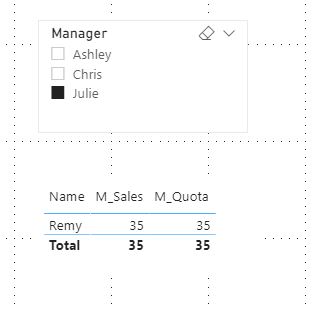
Default:

3.png

Select Ashley:

4.png

Select Julie:

5.png

You can download the pbix file from this link: Data Modelling Question for Changing Managers Intra-Year


Best Regards,

Rico Zhou


If this post helps, then please consider Accept it as the solution to help the other members find it more quickly. 

View solution in original post

4 REPLIES 4
Anonymous
Not applicable

Hi @Anonymous 

There are too many relationships between your tables, and it is not easy to get result just by building relationships.

You may achieve your goal by measure.

Add a Fiscal Period column to Sales table.

Result:

1.png

Then build measures to achieve your goal.

M_Sales = 
VAR _selectvalue =
    SELECTEDVALUE ( 'Hierarchy'[Manager] )
VAR _NameH =
    CALCULATE ( MAX ( 'Hierarchy'[Name] ), 'Hierarchy'[Manager] = _selectvalue )
VAR _FiscalPeriod =
    CALCULATETABLE (
        VALUES ( 'Hierarchy'[Fiscal Period] ),
        'Hierarchy'[Manager] = _selectvalue
    )
VAR _Sales =
    CALCULATE (
        SUM ( Sales[Sales] ),
        FILTER ( Sales, Sales[Name] = _NameH && Sales[Fiscal Period] IN _FiscalPeriod )
    )
RETURN
    IF ( ISFILTERED ( 'Hierarchy'[Manager] ), _Sales, BLANK () )
M_Quota = 
VAR _selectvalue =
    SELECTEDVALUE ( 'Hierarchy'[Manager] )
VAR _NameH =
    CALCULATE ( MAX ( 'Hierarchy'[Name] ), 'Hierarchy'[Manager] = _selectvalue )
VAR _FiscalPeriod =
    CALCULATETABLE (
        VALUES ( 'Hierarchy'[Fiscal Period] ),
        'Hierarchy'[Manager] = _selectvalue
    )
VAR _Quota =
    CALCULATE (
        SUM ( Quota[Quota] ),
        FILTER ( Quota, Quota[Name] = _NameH && Quota[Fiscal Period] IN _FiscalPeriod )
    )
RETURN
    IF ( ISFILTERED ( 'Hierarchy'[Manager] ), _Quota, BLANK () )

Result:

Default:

3.png

Select Ashley:

4.png

Select Julie:

5.png

You can download the pbix file from this link: Data Modelling Question for Changing Managers Intra-Year


Best Regards,

Rico Zhou


If this post helps, then please consider Accept it as the solution to help the other members find it more quickly. 
Anonymous
Not applicable

Thank you!

amitchandak
Super User
Super User

@Anonymous , at first look, There are too many many to many relationships. the need of Hierarchy many to many?

Share with Power BI Enthusiasts: Full Power BI Video (20 Hours) YouTube
Microsoft Fabric Series 60+ Videos YouTube
Microsoft Fabric Hindi End to End YouTube
Anonymous
Not applicable

In my hierarchy table there are repeat values for each salesperson because there are multiple fiscal periods, so I don't know of a way to create a many to one relationship with this table. Is there a way?  


PowerBI2020_0-1597329795373.png


Helpful resources

Announcements
New to Fabric survey Carousel

New to Fabric Survey

If you have recently started exploring Fabric, we'd love to hear how it's going. Your feedback can help with product improvements.

Power BI DataViz World Championships carousel

Power BI DataViz World Championships - June 2026

A new Power BI DataViz World Championship is coming this June! Don't miss out on submitting your entry.

Join our Fabric User Panel

Join our Fabric User Panel

Share feedback directly with Fabric product managers, participate in targeted research studies and influence the Fabric roadmap.

March Power BI Update Carousel

Power BI Community Update - March 2026

Check out the March 2026 Power BI update to learn about new features.