Don't miss your chance to take the Fabric Data Engineer (DP-700) exam on us!
Learn moreWe've captured the moments from FabCon & SQLCon that everyone is talking about, and we are bringing them to the community, live and on-demand. Starts on April 14th. Register now
Hi
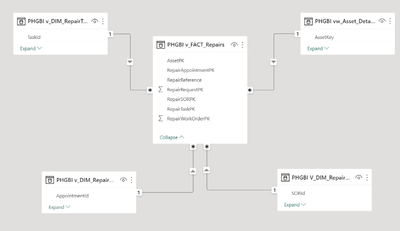
For the last 3 years of using power bi I have been modelling fact and dimensions myself in PB desktop. Alway trying to aim for a star schema where possible or at least as close as possible (see example below)
However were are moving to a new management system and our data warehouse team have decided to model facts and dimensions in SQL . This means I now inport a sigle facts table with dimension columns that can be expanded. Example below shows these DIM columns with values
Can you advise how best I can use this type of table or should I request the warehouse team provide single facts and and single dim tables for me to model myself.
I would be greatfull for eny advise or resources to learn more about this type of table.
regards
RIchard
Solved! Go to Solution.
Ideally you would get the warehouse team to provide the separate fact and dimension tables as you suggest, but if that's not an option then you could use Power Query. You could reference the main query shown in your screenshot, once for each dimension table you want to create, delete the unneeded columns from each reference and then expand out the remaining column. That would seem like quite a bit of work for you though.
You definetely don't want all the facts and dimensions combined into one table. That would cause performance problems and also introduce problems with SUMMARIZECOLUMNS and autoexist.
Thank you for the prompt response john75 I am with you about asking the warehouse team to resort back to seperate fact / dim tables
Richard😀
Ideally you would get the warehouse team to provide the separate fact and dimension tables as you suggest, but if that's not an option then you could use Power Query. You could reference the main query shown in your screenshot, once for each dimension table you want to create, delete the unneeded columns from each reference and then expand out the remaining column. That would seem like quite a bit of work for you though.
You definetely don't want all the facts and dimensions combined into one table. That would cause performance problems and also introduce problems with SUMMARIZECOLUMNS and autoexist.
If you have recently started exploring Fabric, we'd love to hear how it's going. Your feedback can help with product improvements.
A new Power BI DataViz World Championship is coming this June! Don't miss out on submitting your entry.
Share feedback directly with Fabric product managers, participate in targeted research studies and influence the Fabric roadmap.
| User | Count |
|---|---|
| 56 | |
| 40 | |
| 36 | |
| 20 | |
| 18 |
| User | Count |
|---|---|
| 73 | |
| 73 | |
| 38 | |
| 35 | |
| 26 |