Don't miss your chance to take the Fabric Data Engineer (DP-600) exam for FREE! Find out how by attending the DP-600 session on April 23rd (pacific time), live or on-demand.
Learn moreNext up in the FabCon + SQLCon recap series: The roadmap for Microsoft SQL and Maximizing Developer experiences in Fabric. All sessions are available on-demand after the live show. Register now
Hello All
I am very new to Power BI , Please pardon any mistakes , I have to make couple report
1. All auto dealer , with in selected area (predefined Zip Codes) of one Dealer , Sales .
2. All Auto dealer Sales by Make (like Honda), with in selected area (predefined Zip Codes) of one Dealer , Plus Sales by Make for selected Dealer .
I am able to do First (attached Pics) , But not second requirement , as i am not able to pass establish relationship between two or not able to pass Seleted Dealer and area as a parameter to other .
Can somebody shade any light on it .
Greatly Appriciated .
Solved! Go to Solution.
Hi @SAG1,
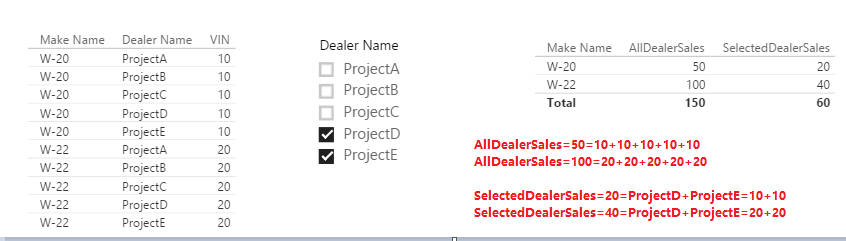
If below result meets your requirement, you could create two measures like:
AllDealerSales = CALCULATE(SUM(DATATable[VIN]),ALLEXCEPT(DealerTable,DATATable[Make Name])) SelectedDealerSales = CALCULATE(SUM(DATATable[VIN]),ALLSELECTED(DealerTable[Dealer Name]))
Then, add DATATable[Make Name] and the above two measures into a table visual.
If I have something misunderstood, please correct me. Please elaborate what does "pass establish relationship between two or not able to pass Seleted Dealer and area as a parameter to other" mean. What is the relationship? And between which two? And please simplify your source data, take some examples to describe how to calculate "AllDealerSalesinSelectedZip" and "SelectedDealerSalesinselectedZIp".
Regards,
Yuliana Gu
Hi @SAG1,
If below result meets your requirement, you could create two measures like:
AllDealerSales = CALCULATE(SUM(DATATable[VIN]),ALLEXCEPT(DealerTable,DATATable[Make Name])) SelectedDealerSales = CALCULATE(SUM(DATATable[VIN]),ALLSELECTED(DealerTable[Dealer Name]))
Then, add DATATable[Make Name] and the above two measures into a table visual.
If I have something misunderstood, please correct me. Please elaborate what does "pass establish relationship between two or not able to pass Seleted Dealer and area as a parameter to other" mean. What is the relationship? And between which two? And please simplify your source data, take some examples to describe how to calculate "AllDealerSalesinSelectedZip" and "SelectedDealerSalesinselectedZIp".
Regards,
Yuliana Gu
Thank You buddy ! it did work with two measures , i had to add additional filter in measure formula but it worked .
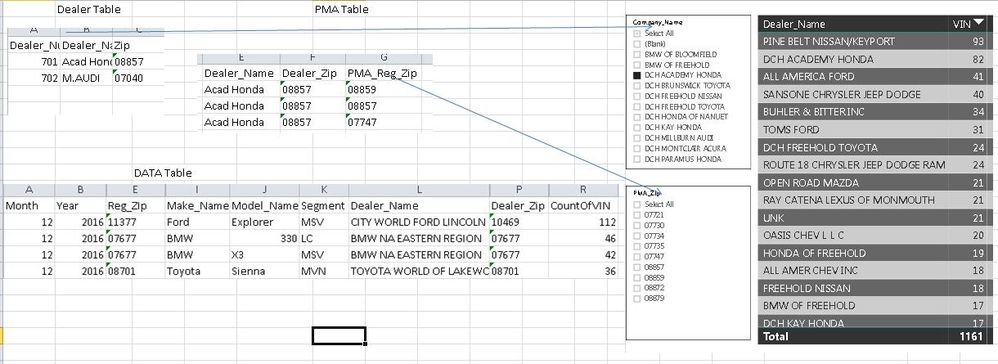
Sorry i forgot to provide my DB Structure , this is how it looks (Attached Pic)
.
I need to make Another report out of it which show
MakeName AllDealerSalesinSelectedZip SelectedDealerSalesinselectedZIp
Honda 158 82
Acura 160 0
Any help please !
If you have recently started exploring Fabric, we'd love to hear how it's going. Your feedback can help with product improvements.
A new Power BI DataViz World Championship is coming this June! Don't miss out on submitting your entry.
Experience the highlights from FabCon & SQLCon, available live and on-demand starting April 14th.
| User | Count |
|---|---|
| 47 | |
| 44 | |
| 40 | |
| 20 | |
| 15 |
| User | Count |
|---|---|
| 70 | |
| 67 | |
| 32 | |
| 27 | |
| 25 |