Hello,
Long time lurker, first time poster. What a wonderful community and resource.
I'm having a little trouble modeling Microsoft Forms data. I've done reporting for years, but have little experince in creating data models. I have a general understanding of modeling but I am looking for feedback.
I have a solution writing Forms data to an Excel OneDrive file that is connected to Power BI. I'm working in Power Query to create dimensions and fact tables. The survey is essentially a tool for supervisors to analyze performance. There are a series of likert scale questions for two categories; Category and Elements.
Example of Flat file structure:
| date | Office | Supervisor | Employee | Question 1 | Question 2 | Question 3 | Question 4 | Question 5 |
| 1/1/2019 | X Office | X Supervisor | X Emloyee | Agree | Disagree | Strongly Agree | Agree | Yes/No |
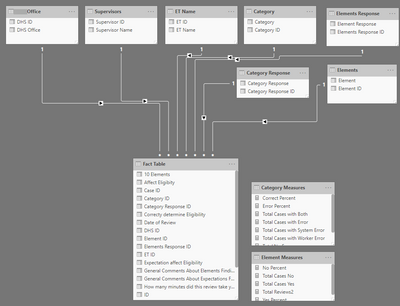
Current model:
Dimensions: Date, Office, Supervisor, and Employee, Category questions, Category Response (Agree, etc) Element questions, Element responses (Yes/No).
Pivoted Fact Table with keys for date, Office, Supervisor, and Employee
Measures for Total Responses, Total Agree, Total Disagree, etc. Plus measures for percent of each.
Current model:
Is this a good way to model survey data? Not sure about the pivoted 'fact table.' Where can I find info on creating survey data models for Power BI or do you have any recomendations?


