


cancel
Showing results for 
Search instead for 
Did you mean: 

We've captured the moments from FabCon & SQLCon that everyone is talking about, and we are bringing them to the community, live and on-demand. Starts on April 14th. Register now

Reply
Anonymous
Not applicable

Data Missing when Convert Table Visual to Matrix Visual

Could anyone help on this? Thanks.

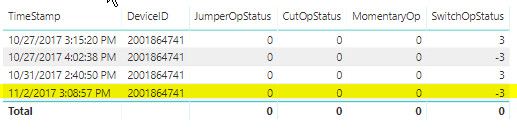
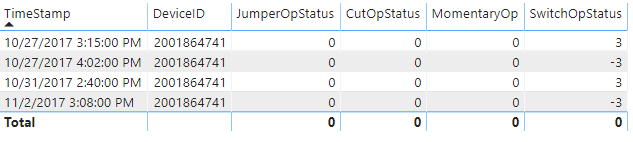
I have Table Visual as follows

Table.jpg

when I convert it a Matrix Visual shown as below, the highlighed row data are missing. I don't have any additional filters applied on the Matrix Visual.

Matrix.jpg

 
1 ACCEPTED SOLUTION
Anonymous
Not applicable

Thanks, Giotto.


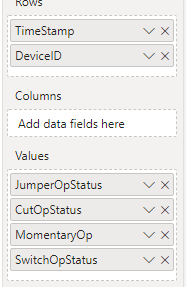
When I move  [DeviceID] to matrix rows no data missing was observed. I some kind of found the problem cause.


I have defined a measure 


FeederSlicer = if(min(DeviceOperationsBy2Step[DeviceFeeder]) in values(FeederList[FeederID]) || min(DeviceOperationsBy2Step[DeviceAltFeeder]) in values(FeederList[FeederID]),1,0)
 
I used it to filter the table based on two columns [DeviceFeeder] and [DeviceAltFeeder]. This masure has been applied on both the Table Visual and Matrix Visual. However, for Matrix Visual, it seems this measure is not calculated like cell by cell.
 
I found one workaround is to have both DeviceID in Rows and Columns.
 
Not sure how to share the file. It is pretty big.
 
Thanks again.


View solution in original post

2 REPLIES 2
v-gizhi-msft
Community Support
Community Support

Hi,


According to your description, I create a table to test:

21.png

Choose a table visual:

22.png

Then, choose a matrix visual:

23.png

It shows the correct result.

So, for your problem, please move [DeviceID] to matrix rows to check whether it still lose the last row:

24.png

And please share your pbix file with me by OneDrive here and remember to remove sensitive data.


Best Regards,

Giotto Zhi

Anonymous
Not applicable

Thanks, Giotto.


When I move  [DeviceID] to matrix rows no data missing was observed. I some kind of found the problem cause.


I have defined a measure 


FeederSlicer = if(min(DeviceOperationsBy2Step[DeviceFeeder]) in values(FeederList[FeederID]) || min(DeviceOperationsBy2Step[DeviceAltFeeder]) in values(FeederList[FeederID]),1,0)
 
I used it to filter the table based on two columns [DeviceFeeder] and [DeviceAltFeeder]. This masure has been applied on both the Table Visual and Matrix Visual. However, for Matrix Visual, it seems this measure is not calculated like cell by cell.
 
I found one workaround is to have both DeviceID in Rows and Columns.
 
Not sure how to share the file. It is pretty big.
 
Thanks again.


Helpful resources

Announcements
New to Fabric survey Carousel

New to Fabric Survey

If you have recently started exploring Fabric, we'd love to hear how it's going. Your feedback can help with product improvements.

Power BI DataViz World Championships carousel

Power BI DataViz World Championships - June 2026

A new Power BI DataViz World Championship is coming this June! Don't miss out on submitting your entry.

Join our Fabric User Panel

Join our Fabric User Panel

Share feedback directly with Fabric product managers, participate in targeted research studies and influence the Fabric roadmap.