


This is best Fabric, Power BI, SQL and AI community event. How do we know? The last event sold out! Save €200 with code FABCMTY200.
Register nowA new Data Days event is coming soon! This time we’re going bigger than ever. Fabric, Power BI, SQL, AI and more. Don't miss out.
Could anyone help on this? Thanks.
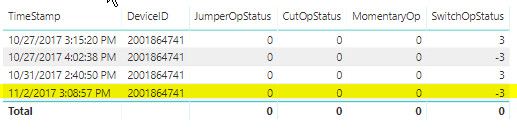
I have Table Visual as follows
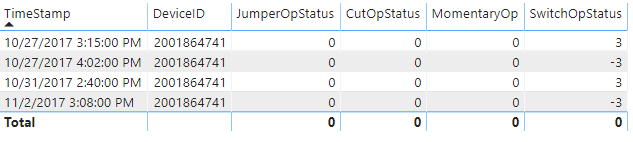
when I convert it a Matrix Visual shown as below, the highlighed row data are missing. I don't have any additional filters applied on the Matrix Visual.
Solved! Go to Solution.
Thanks, Giotto.
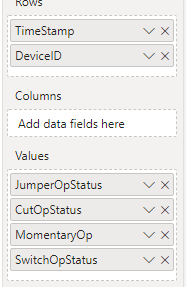
When I move [DeviceID] to matrix rows no data missing was observed. I some kind of found the problem cause.
I have defined a measure
Hi,
According to your description, I create a table to test:
Choose a table visual:
Then, choose a matrix visual:
It shows the correct result.
So, for your problem, please move [DeviceID] to matrix rows to check whether it still lose the last row:
And please share your pbix file with me by OneDrive here and remember to remove sensitive data.
Best Regards,
Giotto Zhi
Thanks, Giotto.
When I move [DeviceID] to matrix rows no data missing was observed. I some kind of found the problem cause.
I have defined a measure
Check out the May 2026 Power BI update to learn about new features.
Sign up to receive a private message when registration opens and key events begin.
If you have recently started exploring Fabric, we'd love to hear how it's going. Your feedback can help with product improvements.
| User | Count |
|---|---|
| 31 | |
| 26 | |
| 23 | |
| 22 | |
| 15 |
| User | Count |
|---|---|
| 62 | |
| 47 | |
| 28 | |
| 24 | |
| 21 |