cancel
Showing results for 
Search instead for 
Did you mean: 

The Power BI Data Visualization World Championships is back! Get ahead of the game and start preparing now! Learn more

Reply
Anonymous
Not applicable

Data Label with Parenthesis

Hi All,


I'm working for a Finance dashboard. I have a KPI which default values always negative.

I have to show it with Parenthesis.

As an example

My KPI Default               Needed Style
-1.598.241                           (1.598.241) 

I don't want to convert it to text because i couldn't use it in most of charts with text.

Is there any option to do this ? 

Thanks all 

6 REPLIES 6
v-piga-msft
Resident Rockstar
Resident Rockstar

Hi @Anonymous ,


Are all the KPI values negative? It they are, you could create a calcualted column or custom column like below.


column= 'Table1'[kpi]* -1

If your KPI values are both negative and positive numbers, you could create the calculated column with IF function.


Column = IF('Table1'[kpi]<0,'Table1'[kpi]*-1,'Table1'[kpi])

If you still need help, please share your data sample and your desired output so that we could help further on it.


Best Regards,

Cherry

Community Support Team _ Cherry Gao
If this post helps, then please consider Accept it as the solution to help the other members find it more quickly.
Anonymous
Not applicable

You completely didn't understand what i want. I don't want to change the values sign to negative or positive. I just want to show negative values with Parenthesis.

As an example from excel, there is an option in home page to format cell behavior. I need something like that

 Screenshot_7.png

Hi @Anonymous ,


Sorry for my misunderstood.


I'm afraid that there is no similar options in power bi as that in excel.


You could try the calculated column with the formula below.

Column =
IF (
    'Table1'[Data] < 0,
    "(" & 'Table1'[Data] * -1 & ")",
    FORMAT ( 'Table1'[Data], 'Table1'[Data] )
)

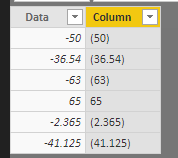
Here is the output.


Capture.PNG


Best  Regards,

Cherry

Community Support Team _ Cherry Gao
If this post helps, then please consider Accept it as the solution to help the other members find it more quickly.
Anonymous
Not applicable

as i understand you were changed the Data Type to Text. I'm unable to use text data type because of making mathematical operations.

Is it possible to do that with with decimal number or whole number data types ?

Hi @Anonymous ,

Sorry for the delay.

By my tests, I'm afraid that the data lable with "()" will be identified as text type in Power BI Dekstop.

May be you could use the whole number type column make mathematical operations and use text type to show in the visual?

Best  Regards,

Cherry


Community Support Team _ Cherry Gao
If this post helps, then please consider Accept it as the solution to help the other members find it more quickly.
Anonymous
Not applicable

+ i can't use it in any grapichal visual expect matrix table or score card.

Helpful resources

Announcements
Power BI DataViz World Championships

Power BI Dataviz World Championships

The Power BI Data Visualization World Championships is back! Get ahead of the game and start preparing now!

December 2025 Power BI Update Carousel

Power BI Monthly Update - December 2025

Check out the December 2025 Power BI Holiday Recap!

FabCon Atlanta 2026 carousel

FabCon Atlanta 2026

Join us at FabCon Atlanta, March 16-20, for the ultimate Fabric, Power BI, AI and SQL community-led event. Save $200 with code FABCOMM.