cancel
Showing results for 
Search instead for 
Did you mean: 

July 28 - August 9 | Final Round of the Power BI Dataviz World Championships. This is your chance. Learn more

Reply
Nexter
Advocate IV
Advocate IV

Data Label Number Format Only Shows One Type?

Hi all,


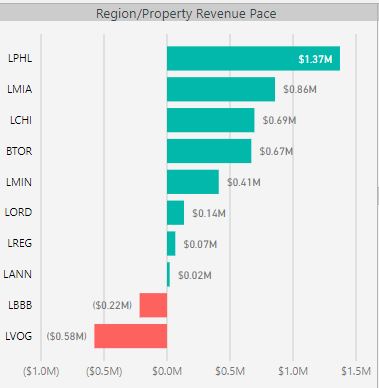
I was wondering if someone could explain the logic in the below screenshot to me.  In Power BI, data labels seem to only have the ability to display one type of number format.  i.e. if there are numbers in the millions, and numbers in the thousands, data labels can only show either M or K, not both (even when set to auto).


I searched high and low for a fix/workaround, but to no avail.  This led me to belive that perhaps there is a reason behind this that I simply don't understand.  Can anyone let me know what the rationale might be behind this, or perhaps if there is no rationale but rather MS just hasn't provided a solution for this?  Thanks!!!


Capture.PNG

1 ACCEPTED SOLUTION
MFelix
Super User
Super User

Hi @Nexter,


This is a question of readability, on the visuals. As a best practice the labels for the same data should be formatted in the same way otherwise the users will get issues in reading the data.


In Excel you can set point by point the data labels but in PBI this is formatted by group of data and  not single point.


Regards,

MFelix


Regards

Miguel Félix


Did I answer your question? Mark my post as a solution!

Proud to be a Super User!

Check out my blog: Power BI em Português


View solution in original post

4 REPLIES 4
MFelix
Super User
Super User

Hi @Nexter,


This is a question of readability, on the visuals. As a best practice the labels for the same data should be formatted in the same way otherwise the users will get issues in reading the data.


In Excel you can set point by point the data labels but in PBI this is formatted by group of data and  not single point.


Regards,

MFelix


Regards

Miguel Félix


Did I answer your question? Mark my post as a solution!

Proud to be a Super User!

Check out my blog: Power BI em Português


Thanks @MFelix


I can see how that makes sense. 


It's just frustrating though that you don't even have the option.  I see both choices as having their drawbacks; mixing the formats could potentially lead to a little confusion, but forcing my end users to think about what .14M and .07M translates to also adds a few seconds of extra comprehension (though obviously for most people those mental calculations will be instantaneous but still...).

Also,  .07M doesn't give as much information as if it were to read 71.2K


Arghhh!

Hi @Nexter,


Why don't you add more decimals to the value. you would get 0,712M not sure if it helps.


Regards,

MFelix


Regards

Miguel Félix


Did I answer your question? Mark my post as a solution!

Proud to be a Super User!

Check out my blog: Power BI em Português


Helpful resources

Announcements
FabCon and SQLCon Barcelona 2026

FabCon & SQLCon – Barcelona 2026

Join us in Barcelona for FabCon and SQLCon, the Fabric, Power BI, SQL, and AI community event. Save €200 with code FABCMTY200.

Fabric Community Sticker Design Challenge Barcelona Carousel

Fabric Community Sticker Challenge - Barcelona 2026

If you love stickers, then you will definitely want to check out our community sticker challenge, Barcelona edition!

July Power BI Update Carousel

Power BI Monthly Update - July 2026

Check out the July 2026 Power BI update to learn about new features.

Power BI DataViz World Championships carousel

Power BI DataViz World Championships - June 2026

A new Power BI DataViz World Championship is coming this June! Don't miss out on submitting your entry.

Top Solution Authors