cancel
Showing results for 
Search instead for 
Did you mean: 

Data Days is here! Join us now for 60+ days of learning, challenges, and connection. Learn more

Reply
Anonymous
Not applicable

Data Format - Line Graph

Evening all,

I'm trying to import some data around our weekly CSAT perforamance


CSAT1.PNG


I need to group the 'Excellent' and 'Good' responses then calculate their percetage against total no of responses.


I then need to create a line graph which shows progress from week to week (maximum of 5 weeks showing).


Any help is very much appreciated.

3 REPLIES 3
Anonymous
Not applicable

Actually it's probably a good idea to show you what I have so far and explain some of the troubles I'm having as a newbie.
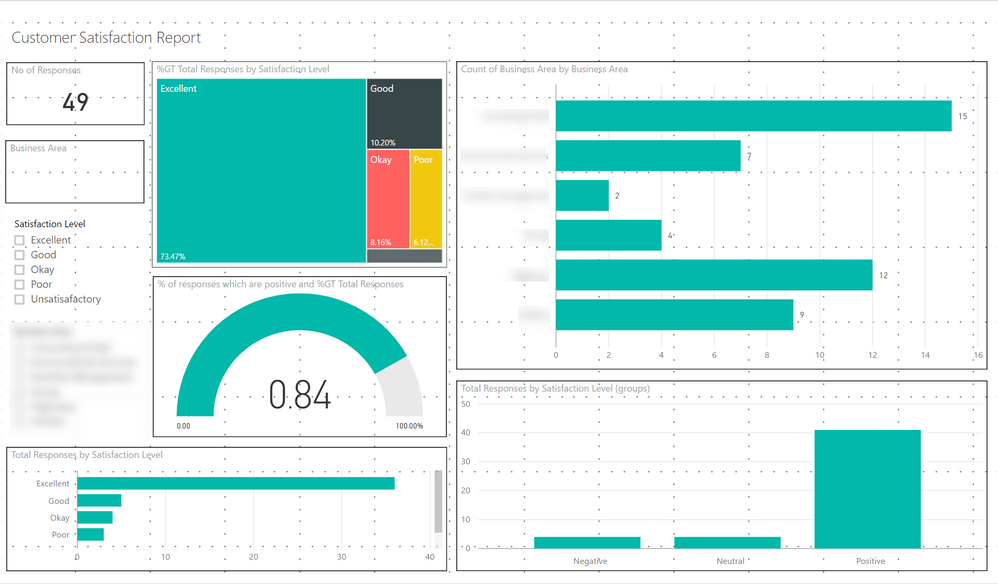
 

R.png


Problem 1


The gauge is showing as 0.84 instead of 84%.


Problem 2


Bottom left chart I want to be the line graph discussed above.


Problem 3


Under the total number of responses card I want a kpi indicator arrow (red, green) to show the trend from last week.


Problem 4


Bottom right graph I want to be show as stacked bar chart.


I want this to show the service that our customers where feeding back against (broken down by negative, positive). The problem is this service is in a seperate data source so I need to match the reference column in datasource1 to the reference in datasource2 and pull ou the service.


Problem 5


I need to drop in new data each week without having to manually go through and amend these reports.


I'm learning this stuff slowly but I'm in such a rush for these reports I may have to pay to have them developed.


Hi @Anonymous,

The screenshot you post on the original thread is your resource data? I really understand you are urgent for these reports. While I am unable to reproduce your scenario without sample data table. You'd better post your sample data.

In addition, the second screenshot is what you want or you have done what like that? It's confusing.

Thanks,
Angelia

@Anonymous


Problem 1


The gauge is showing as 0.84 instead of 84%.


porcent.gif


Lima - Peru

Helpful resources

Announcements
Fabric Data Days is here Carousel

Fabric Data Days 2026

Don't miss out on Data Days, June 15 through August 7. Learn Fabric, Power BI, SQL, AI and more.

May Power BI Update Carousel

Power BI Monthly Update - May 2026

Check out the May 2026 Power BI update to learn about new features.

Power BI DataViz World Championships carousel

Power BI DataViz World Championships - June 2026

A new Power BI DataViz World Championship is coming this June! Don't miss out on submitting your entry.