Get certified for free when you join Fabric Data Days 2026 and dive into Fabric, Power BI, SQL, AI, and other essential data skills.
Join nowData Days is here! Join us now for 60+ days of learning, challenges, and connection. Learn more
Hi,
I am trying to filter the below table so that I am left with 1 record per name with most recent update.
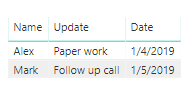
Example: In the below case; I would be left with the highlighted rows as desired output.
| Name | Update | Date |
| Mark | Initiall Call | 1/1/2019 |
| Mark | Follow up call | 1/5/2019 |
| Alex | Initial Call | 1/2/2019 |
| Alex | Follow up call | 1/3/2019 |
| Alex | Paper work | 1/4/2019 |
Any thoughts on how do I achieve this in Power BI?
Thanks!
Solved! Go to Solution.
Hi @Anonymous ,
You can create a calculated table using DAX below.
Table = FILTER(Table1,Table1[Date]=CALCULATE(MAX(Table1[Date]),FILTER(Table1,Table1[Name]=EARLIER(Table1[Name]))))
Best Regards,
Amy
If this post helps, then please consider Accept it as the solution to help the other members find it more quickly.
Hi @Anonymous ,
You can create a calculated table using DAX below.
Table = FILTER(Table1,Table1[Date]=CALCULATE(MAX(Table1[Date]),FILTER(Table1,Table1[Name]=EARLIER(Table1[Name]))))
Best Regards,
Amy
If this post helps, then please consider Accept it as the solution to help the other members find it more quickly.
Hi @Anonymous
Create a new calculated table:
FILTER (
Table1,
Table1[Date]
= CALCULATE ( MAX ( Table1[Date] ), ALLEXCEPT ( Table1, Table1[Date] ) )
)
Don't miss out on Data Days, June 15 through August 7. Learn Fabric, Power BI, SQL, AI and more.
Check out the May 2026 Power BI update to learn about new features.
| User | Count |
|---|---|
| 23 | |
| 23 | |
| 20 | |
| 18 | |
| 14 |
| User | Count |
|---|---|
| 58 | |
| 51 | |
| 41 | |
| 30 | |
| 24 |