cancel
Showing results for 
Search instead for 
Did you mean: 

Learn from the best! Meet the four finalists headed to the FINALS of the Power BI Dataviz World Championships! Register now

Reply
Arcadis_PowerBI
New Member

Data Cleaning

Hi Community,


My source excel file has data merged into once column. I want to do the data cleaning within Power BI.


The data looks like this in one column after importing into Power BI:


Task - 000010 RCRA Report

4/19/2017

8/2/2018

9/5/2015

Task - 50002 Groundwater Report

12/6/2017

1/11/2018

Task  - 50003 Ecological Report

8/8/2017

and so on...


Essentially, the task information should be in one column and the dates should be in another column. I thought about duplicating the column and using find/replace for both. However, I have too many different tasks and dates to use find and replace easily. Is there a way to separate the two different types of data into two columns: one column with dates and the other with tasks? Thank you for the help!

1 ACCEPTED SOLUTION
v-yuta-msft
Community Support
Community Support

Hi Arcadis_PowerBI,


It's a little bit complex to implement data clean using power query, so I would recommend you to use extract your data into python pandas framework and do the data transform and clean in python. About how to implement python script in power query, please refer to this announcement: https://powerbi.microsoft.com/en-us/blog/power-bi-desktop-august-2018-feature-summary/#python.


Regards,

Jimmy Tao

View solution in original post

2 REPLIES 2
jameshart1
New Member

Hi all


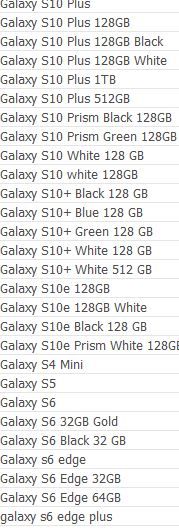
I'm trying to tidy a data set to only show model type:  Samsung S10, iPhone XR, iPhone XS Max, etc and remove anything that might be a colour or storage size.  Is this possible? (See screenshot)


Capture.JPG

v-yuta-msft
Community Support
Community Support

Hi Arcadis_PowerBI,


It's a little bit complex to implement data clean using power query, so I would recommend you to use extract your data into python pandas framework and do the data transform and clean in python. About how to implement python script in power query, please refer to this announcement: https://powerbi.microsoft.com/en-us/blog/power-bi-desktop-august-2018-feature-summary/#python.


Regards,

Jimmy Tao

Helpful resources

Announcements
Join our Fabric User Panel

Join our Fabric User Panel

Share feedback directly with Fabric product managers, participate in targeted research studies and influence the Fabric roadmap.

February Power BI Update Carousel

Power BI Monthly Update - February 2026

Check out the February 2026 Power BI update to learn about new features.

FabCon Atlanta 2026 carousel

FabCon Atlanta 2026

Join us at FabCon Atlanta, March 16-20, for the ultimate Fabric, Power BI, AI and SQL community-led event. Save $200 with code FABCOMM.