Join us at FabCon Atlanta from March 16 - 20, 2026, for the ultimate Fabric, Power BI, AI and SQL community-led event. Save $200 with code FABCOMM.
Register now!The Power BI Data Visualization World Championships is back! Get ahead of the game and start preparing now! Learn more
Hello,
I'm having some trouble getting this data cleaned. It's a nested table, which I understand how to handle but I'm getting hung up on splitting out the Equipment type from the region. I have 80 years worth of data, each in it's own seperate table, with various equipment sub-categories for each year.
I would like to have a result of Column Headers: Equipement Category, Month, Region, Value.
My ultimate goal is to append the cleaned data and drop in a year variable.
| null | JAN | FEB | MAR | APR | MAY | JUN | JUL | AUG | SEP | OCT | NOV | DEC |
| Equipment Category #1 | null | null | null | null | null | null | null | null | null | null | null | null |
| Europe | 550 | 600 | 650 | 700 | 750 | 800 | 850 | 900 | 950 | 1000 | 1050 | 1100 |
| Japan | 391069 | 391119 | 391169 | 391219 | 391269 | 391319 | 391369 | 391419 | 391469 | 391519 | 391569 | 391619 |
| North America | 459924 | 459974 | 460024 | 460074 | 460124 | 460174 | 460224 | 460274 | 460324 | 460374 | 460424 | 460474 |
| Korea | 933860 | 933910 | 933960 | 934010 | 934060 | 934110 | 934160 | 934210 | 934260 | 934310 | 934360 | 934410 |
| Taiwan | 834465 | 834515 | 834565 | 834615 | 834665 | 834715 | 834765 | 834815 | 834865 | 834915 | 834965 | 835015 |
| China | 376170 | 376220 | 376270 | 376320 | 376370 | 376420 | 376470 | 376520 | 376570 | 376620 | 376670 | 376720 |
| Rest of the World | 130233 | 130283 | 130333 | 130383 | 130433 | 130483 | 130533 | 130583 | 130633 | 130683 | 130733 | 130783 |
| Total | 3259588 | 3259638 | 3259688 | 3259738 | 3259788 | 3259838 | 3259888 | 3259938 | 3259988 | 3260038 | 3260088 | 3260138 |
| Equipment Category #2 | null | null | null | null | null | null | null | null | null | null | null | null |
| Europe | 1467 | 1517 | 1567 | 1617 | 1667 | 1717 | 1767 | 1817 | 1867 | 1917 | 1967 | 2017 |
| Japan | 3568 | 3618 | 3668 | 3718 | 3768 | 3818 | 3868 | 3918 | 3968 | 4018 | 4068 | 4118 |
| North America | 19409 | 19459 | 19509 | 19559 | 19609 | 19659 | 19709 | 19759 | 19809 | 19859 | 19909 | 19959 |
| Korea | 8065.333333 | 8115.333333 | 8165.333333 | 8215.333333 | 8265.333333 | 8315.333333 | 8365.333333 | 8415.333333 | 8465.333333 | 8515.333333 | 8565.333333 | 8615.333333 |
| Taiwan | 36999.33333 | 37049.33333 | 37099.33333 | 37149.33333 | 37199.33333 | 37249.33333 | 37299.33333 | 37349.33333 | 37399.33333 | 37449.33333 | 37499.33333 | 37549.33333 |
| China | 1842.666667 | 1892.666667 | 1942.666667 | 1992.666667 | 2042.666667 | 2092.666667 | 2142.666667 | 2192.666667 | 2242.666667 | 2292.666667 | 2342.666667 | 2392.666667 |
| Rest of the World | 239 | 289 | 339 | 389 | 439 | 489 | 539 | 589 | 639 | 689 | 739 | 789 |
| Total | 71590.33333 | 71640.33333 | 71690.33333 | 71740.33333 | 71790.33333 | 71840.33333 | 71890.33333 | 71940.33333 | 71990.33333 | 72040.33333 | 72090.33333 | 72140.33333 |
| Equipment Category #3 | null | null | null | null | null | null | null | null | null | null | null | null |
Solved! Go to Solution.
Hi @Anonymous
Below is the code on how I used the Query Editor to get it into the Shape you require.
let
Source = Table.FromRows(Json.Document(Binary.Decompress(Binary.FromText("tZVNaxRBEIb/yhCvIXR19VcdJXhR8CCCh5DDoqNZSHbiukH89/ZU9TvZguSme5h+3+dZtplhuvbm5uLdz6f948N8OE3Xu9P8Yzn+md7QxeXF4en+/t8ut5d9t6fj8jh3knPo1xL0qrlqrpqb5qZZNItmCsEWa73qr77fPe4OHbBQKGKBCAEkgkQQBmGQBJJAMkgGKZ2su35cjqe76e3DfNx/3XWVskhMI1QN/f4iAgiBEEgEiSAMwiAJJHWy7v5hOc7rrsLcSrDQb3+EQVIgBBACIZAIEkEYhEES2ZP+vNv/1kfdOivZQiYEkAJSQCpIBWkgDURAZJAcOlm3vb7bH9ab5VqoBgsxIoAwCIMkkASSQTJIASkgNdrNfpp/nabl+3S6m6cvy/H+2/rOcYjMI7QRGIRBEkgCySAZpIAUkApSO9HHvZx26/nhmCW3NlLhLW2sbqxurG2sbUw2JoP1V5O3tDHqTA/sC+Mh/v/x0M9fXZdMtlgr1oq1aq1aa9aaNbEm2mI/an5O5KL3WcgWa9VatdasNWtiTbT1U2WLNaL24jwgSUFszbbm0fPoZfQyeh29jt5Gb6PL6JLFzYAWSr5i/ayNyDXnonPROXaOnUvOJeeyc9m58uzc/OgTV+QKX+sHNrnmHDlHzkXnonPsHDuXnEvO5c2dzx5qKV6V9WMvmpw3cU7OXQzJNefIOXIuOhedY+f42b02t/p31mvT/zDNrDlpTpqz5qy5aC6aq+ba5HkmTSugLGF7bJVKcs256lx1rjnXnBPn5Nz15+qac7S514YY/58hdvsX", BinaryEncoding.Base64), Compression.Deflate)), let _t = ((type text) meta [Serialized.Text = true]) in type table [#"null" = _t, JAN = _t, FEB = _t, MAR = _t, APR = _t, MAY = _t, JUN = _t, JUL = _t, AUG = _t, SEP = _t, OCT = _t, NOV = _t, DEC = _t]),
#"Changed Type" = Table.TransformColumnTypes(Source,{{"null", type text}, {"JAN", type number}, {"FEB", type number}, {"MAR", type number}, {"APR", type number}, {"MAY", type number}, {"JUN", type number}, {"JUL", type number}, {"AUG", type number}, {"SEP", type number}, {"OCT", type number}, {"NOV", type number}, {"DEC", type number}}),
#"Renamed Columns" = Table.RenameColumns(#"Changed Type",{{"null", "Details"}}),
#"Duplicated Column" = Table.DuplicateColumn(#"Renamed Columns", "Details", "Details - Copy"),
#"Split Column by Delimiter" = Table.SplitColumn(#"Duplicated Column", "Details - Copy", Splitter.SplitTextByEachDelimiter({"#"}, QuoteStyle.Csv, true), {"Details - Copy.1", "Details - Copy.2"}),
#"Changed Type1" = Table.TransformColumnTypes(#"Split Column by Delimiter",{{"Details - Copy.1", type text}, {"Details - Copy.2", Int64.Type}}),
#"Filled Down" = Table.FillDown(#"Changed Type1",{"Details - Copy.2"}),
#"Added Conditional Column" = Table.AddColumn(#"Filled Down", "Equipment Number", each if [#"Details - Copy.2"] = 1 then "Equipment Category #1" else if [#"Details - Copy.2"] = 2 then "Equipment Category #2" else "Equipment Category #3" ),
#"Removed Columns" = Table.RemoveColumns(#"Added Conditional Column",{"Details - Copy.1", "Details - Copy.2"}),
#"Unpivoted Other Columns" = Table.UnpivotOtherColumns(#"Removed Columns", {"Details", "Equipment Number"}, "Attribute", "Value"),
#"Renamed Columns1" = Table.RenameColumns(#"Unpivoted Other Columns",{{"Attribute", "Month"}})
in
#"Renamed Columns1"And here is what the output looks like, and from here you can then use this to then pass it in for each year.
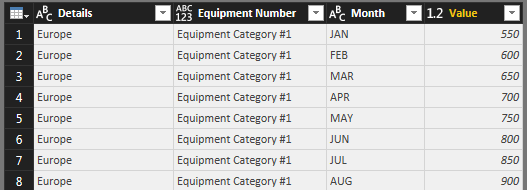
Hi @Anonymous
Below is the code on how I used the Query Editor to get it into the Shape you require.
let
Source = Table.FromRows(Json.Document(Binary.Decompress(Binary.FromText("tZVNaxRBEIb/yhCvIXR19VcdJXhR8CCCh5DDoqNZSHbiukH89/ZU9TvZguSme5h+3+dZtplhuvbm5uLdz6f948N8OE3Xu9P8Yzn+md7QxeXF4en+/t8ut5d9t6fj8jh3knPo1xL0qrlqrpqb5qZZNItmCsEWa73qr77fPe4OHbBQKGKBCAEkgkQQBmGQBJJAMkgGKZ2su35cjqe76e3DfNx/3XWVskhMI1QN/f4iAgiBEEgEiSAMwiAJJHWy7v5hOc7rrsLcSrDQb3+EQVIgBBACIZAIEkEYhEES2ZP+vNv/1kfdOivZQiYEkAJSQCpIBWkgDURAZJAcOlm3vb7bH9ab5VqoBgsxIoAwCIMkkASSQTJIASkgNdrNfpp/nabl+3S6m6cvy/H+2/rOcYjMI7QRGIRBEkgCySAZpIAUkApSO9HHvZx26/nhmCW3NlLhLW2sbqxurG2sbUw2JoP1V5O3tDHqTA/sC+Mh/v/x0M9fXZdMtlgr1oq1aq1aa9aaNbEm2mI/an5O5KL3WcgWa9VatdasNWtiTbT1U2WLNaL24jwgSUFszbbm0fPoZfQyeh29jt5Gb6PL6JLFzYAWSr5i/ayNyDXnonPROXaOnUvOJeeyc9m58uzc/OgTV+QKX+sHNrnmHDlHzkXnonPsHDuXnEvO5c2dzx5qKV6V9WMvmpw3cU7OXQzJNefIOXIuOhedY+f42b02t/p31mvT/zDNrDlpTpqz5qy5aC6aq+ba5HkmTSugLGF7bJVKcs256lx1rjnXnBPn5Nz15+qac7S514YY/58hdvsX", BinaryEncoding.Base64), Compression.Deflate)), let _t = ((type text) meta [Serialized.Text = true]) in type table [#"null" = _t, JAN = _t, FEB = _t, MAR = _t, APR = _t, MAY = _t, JUN = _t, JUL = _t, AUG = _t, SEP = _t, OCT = _t, NOV = _t, DEC = _t]),
#"Changed Type" = Table.TransformColumnTypes(Source,{{"null", type text}, {"JAN", type number}, {"FEB", type number}, {"MAR", type number}, {"APR", type number}, {"MAY", type number}, {"JUN", type number}, {"JUL", type number}, {"AUG", type number}, {"SEP", type number}, {"OCT", type number}, {"NOV", type number}, {"DEC", type number}}),
#"Renamed Columns" = Table.RenameColumns(#"Changed Type",{{"null", "Details"}}),
#"Duplicated Column" = Table.DuplicateColumn(#"Renamed Columns", "Details", "Details - Copy"),
#"Split Column by Delimiter" = Table.SplitColumn(#"Duplicated Column", "Details - Copy", Splitter.SplitTextByEachDelimiter({"#"}, QuoteStyle.Csv, true), {"Details - Copy.1", "Details - Copy.2"}),
#"Changed Type1" = Table.TransformColumnTypes(#"Split Column by Delimiter",{{"Details - Copy.1", type text}, {"Details - Copy.2", Int64.Type}}),
#"Filled Down" = Table.FillDown(#"Changed Type1",{"Details - Copy.2"}),
#"Added Conditional Column" = Table.AddColumn(#"Filled Down", "Equipment Number", each if [#"Details - Copy.2"] = 1 then "Equipment Category #1" else if [#"Details - Copy.2"] = 2 then "Equipment Category #2" else "Equipment Category #3" ),
#"Removed Columns" = Table.RemoveColumns(#"Added Conditional Column",{"Details - Copy.1", "Details - Copy.2"}),
#"Unpivoted Other Columns" = Table.UnpivotOtherColumns(#"Removed Columns", {"Details", "Equipment Number"}, "Attribute", "Value"),
#"Renamed Columns1" = Table.RenameColumns(#"Unpivoted Other Columns",{{"Attribute", "Month"}})
in
#"Renamed Columns1"And here is what the output looks like, and from here you can then use this to then pass it in for each year.
Thank you! This is a new technique for cleaning a nested table, I've been using a different one that would not work in this instance. Appreciate the help.
The Power BI Data Visualization World Championships is back! Get ahead of the game and start preparing now!
| User | Count |
|---|---|
| 37 | |
| 36 | |
| 33 | |
| 31 | |
| 28 |
| User | Count |
|---|---|
| 129 | |
| 88 | |
| 79 | |
| 68 | |
| 63 |