cancel
Showing results for 
Search instead for 
Did you mean: 

Join the FabCon + SQLCon recap series. Up next: Power BI, Real-Time Intelligence, IQ and AI, and Data Factory take center stage. All sessions are available on-demand after the live show. Register now

Reply
Anonymous
Not applicable

Data Between Custom Week Start and Week End Date

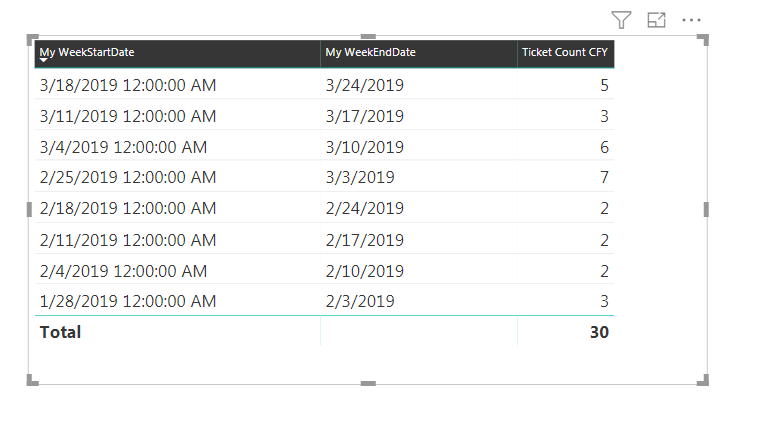
In my report i have created Week Start and Week End date and for my organization the Week Start Date is Monday and End Date is Sunday, This Table Represent count for each Custom WeeksThis Table Represent count for each Custom Weeks

in the table above we have only data until 3/24/2019, but the current date is 27 March 2019 i.e. Week Start Date =3/24/2019 and Week end Date=3/31/2019, since there are no count for this current week it's not showing on the table.


I am looking for way where i can show the Ticket Count CFY= 5 in a card in this week's report, this report is used every monday hence next week (3/24/2019 to 3/31/2019) the card should show data only for 3/24/2019 to 3/31/2019 even if the count is zero.


The above card data should show only last week (3/18/2019 to 3/24/2019) data even if i refresh the data.

1 ACCEPTED SOLUTION

hi, @Anonymous 

Just adjust the measure formula as below:

Measure3 = 
VAR __max = CALCULATE(MAX('Table'[Week End Date]),FILTER('Table','Table'[Week End Date]<TODAY()))
RETURN
SUMX(FILTER('Table',[Week End Date] = __max),[Count])

You could use Current Day instead of TODAY()


Best Regards,

Lin

Community Support Team _ Lin
If this post helps, then please consider Accept it as the solution to help the other members find it more quickly.

View solution in original post

3 REPLIES 3
Greg_Deckler
Community Champion
Community Champion

Seems like you could grap the MAX of the "My WeekEndDate" column and then FILTER down to that row essentially. So, something like:


Measure = 
VAR __max = MAX([My WeekEndDate])
RETURN
SUMX(FILTER('Table',[My WeekEndDate] = __max),[Ticket Count CFY])


Follow on LinkedIn
@ me in replies or I'll lose your thread!!!
Instead of a Kudo, please vote for this idea
Become an expert!: Enterprise DNA
External Tools: MSHGQM
YouTube Channel!: Microsoft Hates Greg
Latest book!:
DAX For Humans

DAX is easy, CALCULATE makes DAX hard...
Anonymous
Not applicable

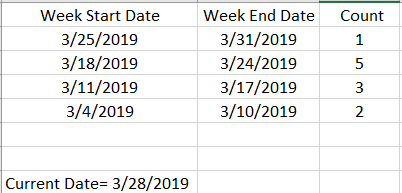
Thank your for the response, Yes that makes sense when we don't have data for the Current week,Let me explain againIn the below example i have data for Week Ending 31 March as well and in this scenario if i run the report on 28th March 2019 i should see only data for 3/18/2019-3/24/2019 i.e. 5, the Data for 03/25/2019 to 03/31/2019 should only be reflected in the report when i run refresh the data on 04/01/2019.

Capture.PNG

hi, @Anonymous 

Just adjust the measure formula as below:

Measure3 = 
VAR __max = CALCULATE(MAX('Table'[Week End Date]),FILTER('Table','Table'[Week End Date]<TODAY()))
RETURN
SUMX(FILTER('Table',[Week End Date] = __max),[Count])

You could use Current Day instead of TODAY()


Best Regards,

Lin

Community Support Team _ Lin
If this post helps, then please consider Accept it as the solution to help the other members find it more quickly.

Helpful resources

Announcements
April Power BI Update Carousel

Power BI Monthly Update - April 2026

Check out the April 2026 Power BI update to learn about new features.

New to Fabric survey Carousel

New to Fabric Survey

If you have recently started exploring Fabric, we'd love to hear how it's going. Your feedback can help with product improvements.

Power BI DataViz World Championships carousel

Power BI DataViz World Championships - June 2026

A new Power BI DataViz World Championship is coming this June! Don't miss out on submitting your entry.

FabCon and SQLCon Highlights Carousel

FabCon &SQLCon Highlights

Experience the highlights from FabCon & SQLCon, available live and on-demand starting April 14th.