Join us at FabCon Atlanta from March 16 - 20, 2026, for the ultimate Fabric, Power BI, AI and SQL community-led event. Save $200 with code FABCOMM.
Register now!The Power BI Data Visualization World Championships is back! Get ahead of the game and start preparing now! Learn more
Hi Guys,
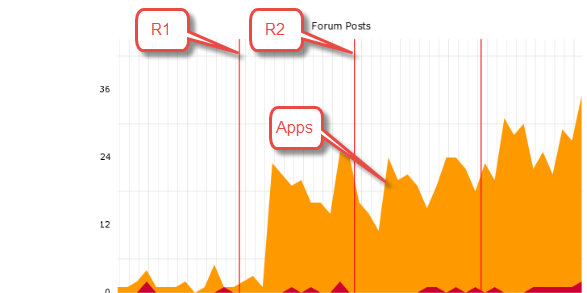
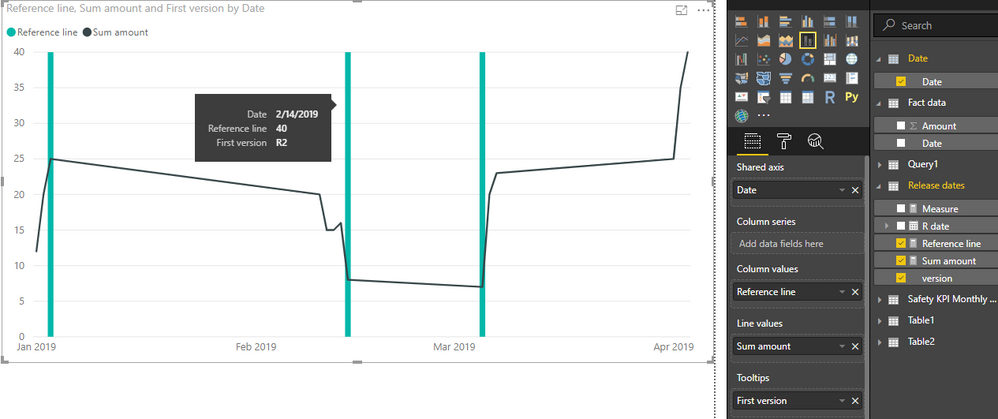
I was recently asked a question if I can create a dashboard where I can show the multiple code releases that happen through the year (mostly once a month) as vertical lines and count of applications received as a line chart.
So, basically identifying if there was an impact on app counts due to a (major/minor)code release. I hvae the dates when the releases happned and will happen in future.
How can I implement such a chart in Power Bi? Any help is really appreciated.
Thanks in advance.
Solved! Go to Solution.
Hi @Anonymous ,
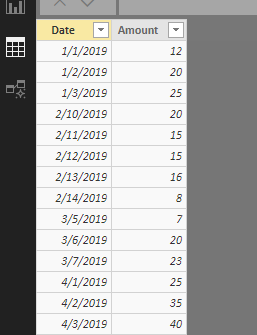
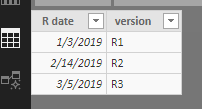
Suppose source tables are similar to below.
New a calendar table first.
Date = CALENDAR(MIN('Fact data'[Date]),MAX('Fact data'[Date]))
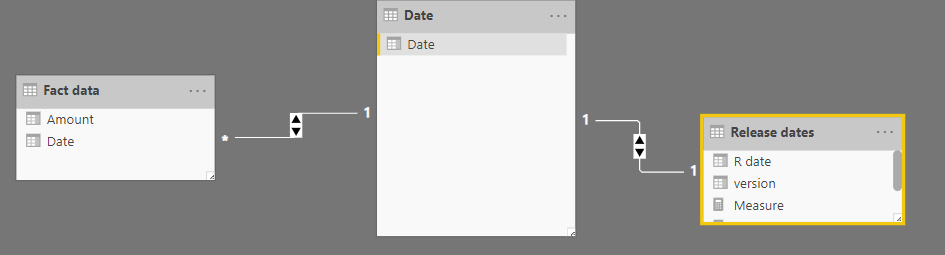
Establish relationship between 'Date' table and source tables.
Create measures.
Sum amount = SUM('Fact data'[Amount])
Reference line =
IF (
SELECTEDVALUE ( 'Release dates'[version] ) <> BLANK (),
MAXX ( ALLSELECTED ( 'Date'[Date] ), [Sum amount] ),
0
)
Insert a line and stacked column chart. Place 'Date'[Date] onto X-axis, place above measures into corresponding sections, and place 'Release dates'[version] into tooltip. Remember to set the type of axis to "Continuous".
Best regards,
Yuliana Gu
Hi @Anonymous ,
Suppose source tables are similar to below.
New a calendar table first.
Date = CALENDAR(MIN('Fact data'[Date]),MAX('Fact data'[Date]))
Establish relationship between 'Date' table and source tables.
Create measures.
Sum amount = SUM('Fact data'[Amount])
Reference line =
IF (
SELECTEDVALUE ( 'Release dates'[version] ) <> BLANK (),
MAXX ( ALLSELECTED ( 'Date'[Date] ), [Sum amount] ),
0
)
Insert a line and stacked column chart. Place 'Date'[Date] onto X-axis, place above measures into corresponding sections, and place 'Release dates'[version] into tooltip. Remember to set the type of axis to "Continuous".
Best regards,
Yuliana Gu
@v-yulgu-msft This is great. Thank you so much!
What if I wanted to add more KPIs ( Apps,Approvals,Fundings etc). Just dragging and dropping into the 'Line Values' section would work fine automatically ?
Yes, and you could even change the color/formatting of those other KPIs.
Yup.. It did work. ![]()
Thank you for the quick responses.
The Power BI Data Visualization World Championships is back! Get ahead of the game and start preparing now!
| User | Count |
|---|---|
| 39 | |
| 37 | |
| 33 | |
| 33 | |
| 29 |
| User | Count |
|---|---|
| 132 | |
| 90 | |
| 78 | |
| 66 | |
| 65 |