Join us at FabCon Atlanta from March 16 - 20, 2026, for the ultimate Fabric, Power BI, AI and SQL community-led event. Save $200 with code FABCOMM.
Register now!The Power BI Data Visualization World Championships is back! It's time to submit your entry. Live now!
Hi Guys,
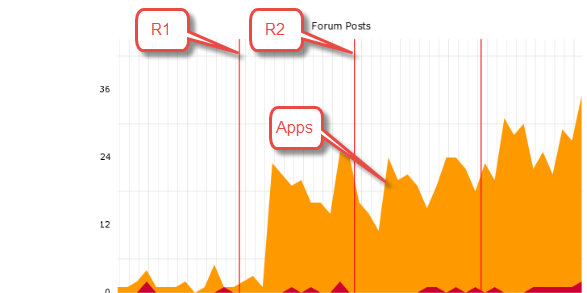
I was recently asked a question if I can create a dashboard where I can show the multiple code releases that happen through the year (mostly once a month) as vertical lines and count of applications received as a line chart.
So, basically identifying if there was an impact on app counts due to a (major/minor)code release. I hvae the dates when the releases happned and will happen in future.
How can I implement such a chart in Power Bi? Any help is really appreciated.
Thanks in advance.
Solved! Go to Solution.
Hi @Anonymous ,
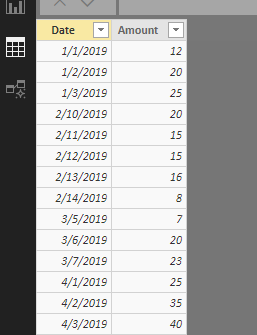
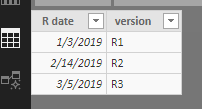
Suppose source tables are similar to below.
New a calendar table first.
Date = CALENDAR(MIN('Fact data'[Date]),MAX('Fact data'[Date]))
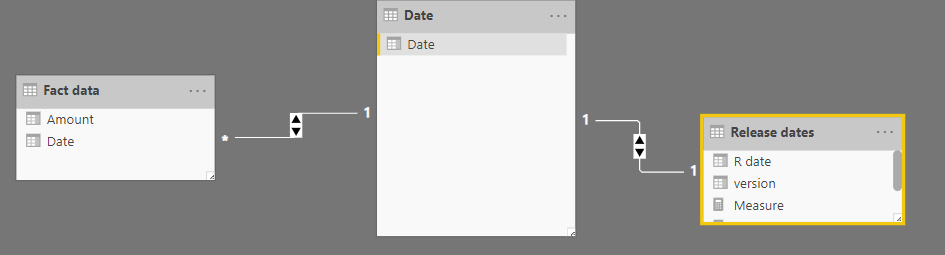
Establish relationship between 'Date' table and source tables.
Create measures.
Sum amount = SUM('Fact data'[Amount])
Reference line =
IF (
SELECTEDVALUE ( 'Release dates'[version] ) <> BLANK (),
MAXX ( ALLSELECTED ( 'Date'[Date] ), [Sum amount] ),
0
)
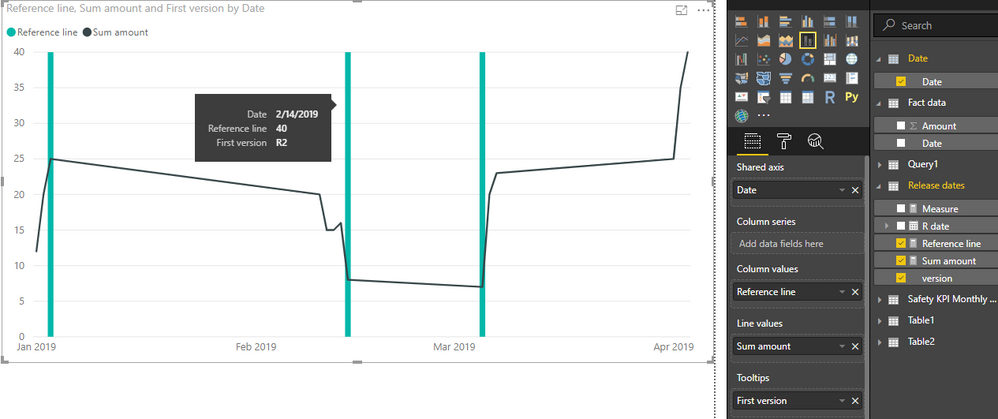
Insert a line and stacked column chart. Place 'Date'[Date] onto X-axis, place above measures into corresponding sections, and place 'Release dates'[version] into tooltip. Remember to set the type of axis to "Continuous".
Best regards,
Yuliana Gu
Hi @Anonymous ,
Suppose source tables are similar to below.
New a calendar table first.
Date = CALENDAR(MIN('Fact data'[Date]),MAX('Fact data'[Date]))
Establish relationship between 'Date' table and source tables.
Create measures.
Sum amount = SUM('Fact data'[Amount])
Reference line =
IF (
SELECTEDVALUE ( 'Release dates'[version] ) <> BLANK (),
MAXX ( ALLSELECTED ( 'Date'[Date] ), [Sum amount] ),
0
)
Insert a line and stacked column chart. Place 'Date'[Date] onto X-axis, place above measures into corresponding sections, and place 'Release dates'[version] into tooltip. Remember to set the type of axis to "Continuous".
Best regards,
Yuliana Gu
@v-yulgu-msft This is great. Thank you so much!
What if I wanted to add more KPIs ( Apps,Approvals,Fundings etc). Just dragging and dropping into the 'Line Values' section would work fine automatically ?
Yes, and you could even change the color/formatting of those other KPIs.
Yup.. It did work. ![]()
Thank you for the quick responses.
The Power BI Data Visualization World Championships is back! It's time to submit your entry.
Check out the January 2026 Power BI update to learn about new features.
| User | Count |
|---|---|
| 56 | |
| 42 | |
| 39 | |
| 23 | |
| 21 |
| User | Count |
|---|---|
| 144 | |
| 106 | |
| 63 | |
| 38 | |
| 31 |