
Join us at FabCon Atlanta from March 16 - 20, 2026, for the ultimate Fabric, Power BI, AI and SQL community-led event. Save $200 with code FABCOMM.
Register now!View all the Fabric Data Days sessions on demand. View schedule
Hi,
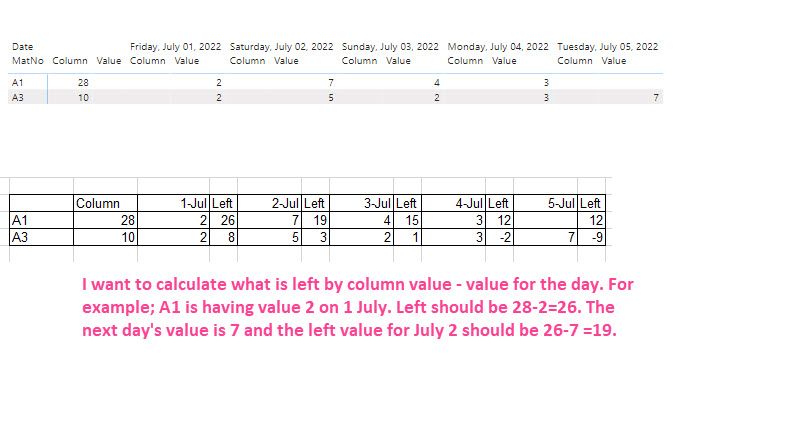
I want to show the daily value in a table/matrix. I have the following sample:
DateValueReadyStorage
| MatNo | Date | Value | Ready | Storage |
| A1 | 7/1/2022 | 2 | null | null |
| A1 | 7/2/2022 | 3 | null | null |
| A1 | 7/2/2022 | 4 | null | null |
| A1 | 7/3/2022 | 4 | null | null |
| A1 | 7/4/2022 | 3 | null | null |
| A1 | null | null | 8 | 20 |
| A3 | null | null | 4 | 6 |
| A3 | 7/1/2022 | 2 | null | null |
| A3 | 7/2/2022 | 5 | null | null |
| A3 | 7/3/2022 | 2 | null | null |
| A3 | 7/4/2022 | 3 | null | null |
| A3 | 7/5/2022 | 2 | null | null |
| A3 | 7/5/2022 | 5 | null | null
|
The column is Ready+Storage. I want to show the daily values after calculating the daily value. The calculation should be what is left by column value - value for the day. For example; A1 is having value 2 on 1 July. The "left" should be 28-2=26. The next day's value is 7 and the "left" value for July 2 should be 26-7 =19 and so on.
Thanks in advance!
Solved! Go to Solution.
Hi @IF ,
Try to add the following measure:
Measure = CALCULATE( sum('Table'[Storage]) + SUM('Table'[Ready]), ALLSELECTED('Table'[Date])) - CALCULATE(SUM('Table'[Value]),'Table'[Date] <= MAX('Table'[Date]))
Regards
Miguel Félix
Proud to be a Super User!
Check out my blog: Power BI em PortuguêsHi @IF ,
Try to add the following measure:
Measure = CALCULATE( sum('Table'[Storage]) + SUM('Table'[Ready]), ALLSELECTED('Table'[Date])) - CALCULATE(SUM('Table'[Value]),'Table'[Date] <= MAX('Table'[Date]))
Regards
Miguel Félix
Proud to be a Super User!
Check out my blog: Power BI em PortuguêsThanks. It works.
Check out the November 2025 Power BI update to learn about new features.
Advance your Data & AI career with 50 days of live learning, contests, hands-on challenges, study groups & certifications and more!