
Join us at FabCon Atlanta from March 16 - 20, 2026, for the ultimate Fabric, Power BI, AI and SQL community-led event. Save $200 with code FABCOMM.
Register now!Vote for your favorite vizzies from the Power BI Dataviz World Championship submissions. Vote now!
Hi,
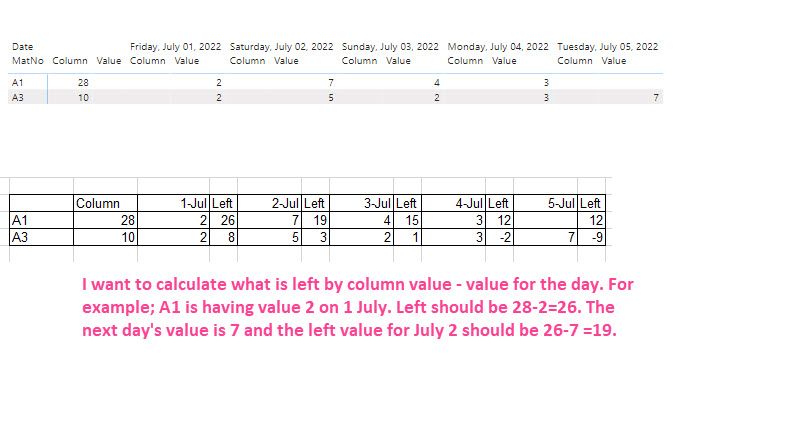
I want to show the daily value in a table/matrix. I have the following sample:
DateValueReadyStorage
| MatNo | Date | Value | Ready | Storage |
| A1 | 7/1/2022 | 2 | null | null |
| A1 | 7/2/2022 | 3 | null | null |
| A1 | 7/2/2022 | 4 | null | null |
| A1 | 7/3/2022 | 4 | null | null |
| A1 | 7/4/2022 | 3 | null | null |
| A1 | null | null | 8 | 20 |
| A3 | null | null | 4 | 6 |
| A3 | 7/1/2022 | 2 | null | null |
| A3 | 7/2/2022 | 5 | null | null |
| A3 | 7/3/2022 | 2 | null | null |
| A3 | 7/4/2022 | 3 | null | null |
| A3 | 7/5/2022 | 2 | null | null |
| A3 | 7/5/2022 | 5 | null | null
|
The column is Ready+Storage. I want to show the daily values after calculating the daily value. The calculation should be what is left by column value - value for the day. For example; A1 is having value 2 on 1 July. The "left" should be 28-2=26. The next day's value is 7 and the "left" value for July 2 should be 26-7 =19 and so on.
Thanks in advance!
Solved! Go to Solution.
Hi @IF ,
Try to add the following measure:
Measure = CALCULATE( sum('Table'[Storage]) + SUM('Table'[Ready]), ALLSELECTED('Table'[Date])) - CALCULATE(SUM('Table'[Value]),'Table'[Date] <= MAX('Table'[Date]))
Regards
Miguel Félix
Proud to be a Super User!
Check out my blog: Power BI em PortuguêsHi @IF ,
Try to add the following measure:
Measure = CALCULATE( sum('Table'[Storage]) + SUM('Table'[Ready]), ALLSELECTED('Table'[Date])) - CALCULATE(SUM('Table'[Value]),'Table'[Date] <= MAX('Table'[Date]))
Regards
Miguel Félix
Proud to be a Super User!
Check out my blog: Power BI em PortuguêsThanks. It works.
Vote for your favorite vizzies from the Power BI World Championship submissions!
If you love stickers, then you will definitely want to check out our Community Sticker Challenge!
Check out the January 2026 Power BI update to learn about new features.
| User | Count |
|---|---|
| 56 | |
| 53 | |
| 40 | |
| 17 | |
| 16 |
| User | Count |
|---|---|
| 122 | |
| 108 | |
| 44 | |
| 32 | |
| 26 |