cancel
Showing results for 
Search instead for 
Did you mean: 

Vote for your favorite vizzies from the Power BI Dataviz World Championship submissions. Vote now!

Reply
Anonymous
Not applicable

Daily change

Hi I have this data set which will be refreshed, and would like to add measure to auto calculate the latest daily changes


Date            Turnover

1/1/2016      555

1/2/2016      333

1/3/2016      666

1/6/2016      777


In the above my measure will show 111 (777-666).


I dont think I am able to use previousday() in dax


Please help me crack this problem,

1 ACCEPTED SOLUTION
Anonymous
Not applicable

Hello @Anonymous


If you're still using daily data, you could use this :


Latest Change = CALCULATE(sum(Turnover[Turnover]);LASTDATE(Turnover[Date])) - CALCULATE(SUM(Turnover[Turnover]);PREVIOUSDAY(LASTDATE(Turnover[Date])))


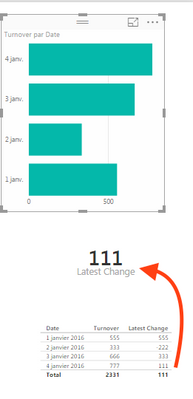
When nothing is selected, the data represente the daily change for the lastDate, without its previous date (777-666):

unselected.png

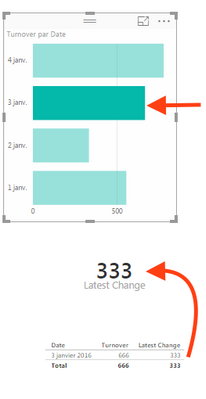
When you selec another date (e.g :January 3rd), you've got the daily change between this date and its previous (666 - 333)

Selected.png

Let me know if that fit what you wanted.


Sébastien

View solution in original post

2 REPLIES 2
Anonymous
Not applicable

Hello @Anonymous


If you're still using daily data, you could use this :


Latest Change = CALCULATE(sum(Turnover[Turnover]);LASTDATE(Turnover[Date])) - CALCULATE(SUM(Turnover[Turnover]);PREVIOUSDAY(LASTDATE(Turnover[Date])))


When nothing is selected, the data represente the daily change for the lastDate, without its previous date (777-666):

unselected.png

When you selec another date (e.g :January 3rd), you've got the daily change between this date and its previous (666 - 333)

Selected.png

Let me know if that fit what you wanted.


Sébastien

Anonymous
Not applicable

Thank you Sebastien, this is the second time you'd helped me. Thank you again.

Helpful resources

Announcements
Power BI DataViz World Championships

Power BI Dataviz World Championships

Vote for your favorite vizzies from the Power BI World Championship submissions!

Sticker Challenge 2026 Carousel

Join our Community Sticker Challenge 2026

If you love stickers, then you will definitely want to check out our Community Sticker Challenge!

January Power BI Update Carousel

Power BI Monthly Update - January 2026

Check out the January 2026 Power BI update to learn about new features.

FabCon Atlanta 2026 carousel

FabCon Atlanta 2026

Join us at FabCon Atlanta, March 16-20, for the ultimate Fabric, Power BI, AI and SQL community-led event. Save $200 with code FABCOMM.