Join us at FabCon Atlanta from March 16 - 20, 2026, for the ultimate Fabric, Power BI, AI and SQL community-led event. Save $200 with code FABCOMM.
Register now!Vote for your favorite vizzies from the Power BI Dataviz World Championship submissions. Vote now!
Hi,
I've asked for this almost 2 month ago, but not response. I'm posting this again hoping somebody can help me.
I have a table with this columns:
RecordDate | TimeTracked | TeamMember | Activity
I need to get the daily average of time tracked for a user and an activity.
I'm using this measure
CALCULATE(AVERAGEX(VALUES(TimeExport[RecordDate]), TimeExport[TotalTracked]))
but this does not have in account days with no time tracked, this only gives me the average for all days with time tracked.
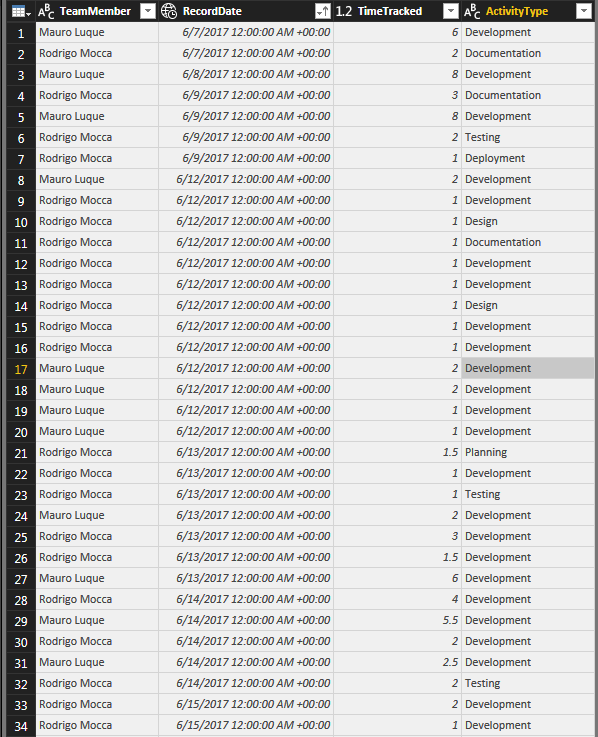
Here is some example data:
How can I do this?
Thanks in advance.
Hi @rodrigomocca,
According to your requirements, the result, could be a table visual, should contain TeamMember, RecordDate, ActivityType. Please check out the demo here.
BTW, if you can input the sample data in TEXT mode, it could be convenient to others to test.
Best Regards,
Dale
Hi, thanks for your answer.
The solution is not what I'm looking for. Maybe the title is confusing.
I'll give you a more detailed example:
Let's say the user Rodrigo Mocca have the following rows:
Date Team Member Activity Time Tracked
| Date | Team Member | Activity | Time Tracked |
| 03/05/2018 | Rodrigo Mocca | Development | 5 |
| 03/06/2018 | Rodrigo Mocca | Development | 3 |
| 03/07/2018 | Rodrigo Mocca | Development | 5 |
| 03/09/2018 | Rodrigo Mocca | Development | 6 |
In the last 5 days, he only track time for development on 4. What I need to get from here is:
"Rodrigo Mocca spends 3.8 in development by day in average".
This result comes from (5+3+5+6)/5
The calculation I have right now gives me 4.75, because doesn't take in account the empty day.
Do you understand my problem now?
Try with this:
Result =
DIVIDE (
SUM ( Table1[Time Tracked] );
DATEDIFF ( MIN ( Table1[Date] ); MAX ( Table1[Date] ); DAY ) + 1
)Maybe need some adjustment when is just 1 day of Difference or if you want to doesn't cout weekends but this is the logic.
Regards
Victor
Vote for your favorite vizzies from the Power BI World Championship submissions!
If you love stickers, then you will definitely want to check out our Community Sticker Challenge!
Check out the January 2026 Power BI update to learn about new features.
| User | Count |
|---|---|
| 65 | |
| 52 | |
| 45 | |
| 23 | |
| 21 |
| User | Count |
|---|---|
| 141 | |
| 114 | |
| 50 | |
| 37 | |
| 30 |