cancel
Showing results for 
Search instead for 
Did you mean: 

The Power BI Data Visualization World Championships is back! Get ahead of the game and start preparing now! Learn more

Reply
joyce23
Frequent Visitor

DEcimal to Time format

How to convert decimal to time format?

I searched in all the queries however i dont see the same scenario as mine.

Ex.

9:00 converted in decimal by Power BI is 0.375.

Now how can i convert 0.365 to hh:mm:ss format. The time i am expecting this time is 8:45:36


Thank you.


Regards,

Joyce

1 ACCEPTED SOLUTION
tex628
Community Champion
Community Champion

Try this:

Measure = 
VAR time = SUM(Summary[NewLoginTime])/Summary[EmployeeName Count])
VAR hours = ROUNDDOWN(24 * time ; 0)
VAR H_rem = 24 * time - ROUNDDOWN(24 * time ; 0)
VAR minutes = ROUNDDOWN(60 * H_rem ; 0)
VAR M_rem = 60 * H_rem - ROUNDDOWN(60 * H_rem ; 0)
VAR seconds = ROUND(60 * M_rem ; 0)
Return
TIME(hours;minutes;seconds)


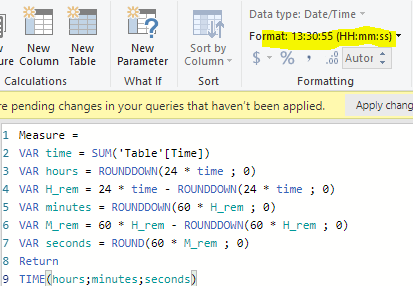
Remember to also change the format to HH:MM:SS:
image.png


Connect on LinkedIn

View solution in original post

5 REPLIES 5
tex628
Community Champion
Community Champion

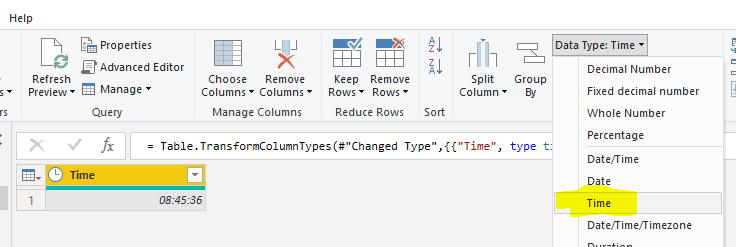
Just changing to time works for me. What are you getting?

Decimal formatDecimal formatTime formatTime format


Connect on LinkedIn

Hi tex628,


Mine is not from a column. It is from a measure or formula.

Ave Time = SUM(Summary[NewLoginTime])/Summary[EmployeeName Count]


Regards,

Joyce

tex628
Community Champion
Community Champion

Try this:

Measure = 
VAR time = SUM(Summary[NewLoginTime])/Summary[EmployeeName Count])
VAR hours = ROUNDDOWN(24 * time ; 0)
VAR H_rem = 24 * time - ROUNDDOWN(24 * time ; 0)
VAR minutes = ROUNDDOWN(60 * H_rem ; 0)
VAR M_rem = 60 * H_rem - ROUNDDOWN(60 * H_rem ; 0)
VAR seconds = ROUND(60 * M_rem ; 0)
Return
TIME(hours;minutes;seconds)


Remember to also change the format to HH:MM:SS:
image.png


Connect on LinkedIn

Hi @joyce23 


Try this:

Ave Time = 
FORMAT ( 
    SUM(Summary[NewLoginTime])/Summary[EmployeeName Count],
    "HH:MM:SS"
)


Best regards,

Martyn


If I answered your question, please help others by accepting it as a solution.

MartynRamsden
Solution Sage
Solution Sage

Hi @joyce23 


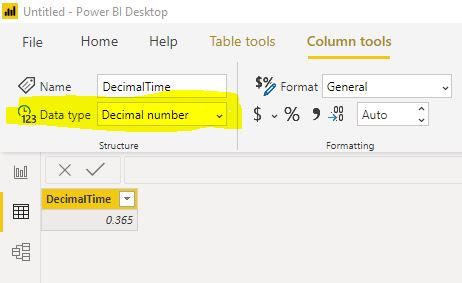
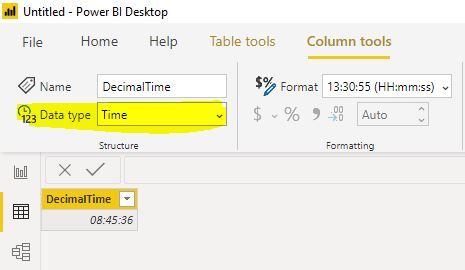
If you have the decimal value in a column, it should just be a case of changing the column Data type.

Go to the Data view, the select the Column tools menu.


Column Data type =  Decimal number:

Capture.JPG


Column Data type = Time:

Capture1.JPG


Best regards,

Martyn


If I answered your question, please help others by accepting it as a solution. 


Helpful resources

Announcements
Power BI DataViz World Championships

Power BI Dataviz World Championships

The Power BI Data Visualization World Championships is back! Get ahead of the game and start preparing now!

December 2025 Power BI Update Carousel

Power BI Monthly Update - December 2025

Check out the December 2025 Power BI Holiday Recap!

FabCon Atlanta 2026 carousel

FabCon Atlanta 2026

Join us at FabCon Atlanta, March 16-20, for the ultimate Fabric, Power BI, AI and SQL community-led event. Save $200 with code FABCOMM.