Don't miss your chance to take the Fabric Data Engineer (DP-600) exam for FREE! Find out how by watching the DP-600 session on-demand now through April 28th.
Learn moreJoin the FabCon + SQLCon recap series. Up next: Power BI, Real-Time Intelligence, IQ and AI, and Data Factory take center stage. All sessions are available on-demand after the live show. Register now
Hello All,Hope everyone is doing excellent.
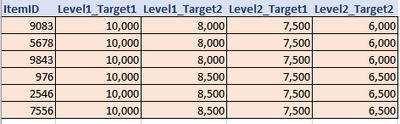
I have Data in attached format. I need to show in Power BI two things:
1) A Slicer that contains two Options; Level 1 & Level 2
2) Another Slicer that conatins two options: Target1 & Target2
So, I need to select Level 1 or Level 2 first (either one of both Levels) and then Select target1 or Target 2 (either one of both targets).
I m not getting any idea to do this in Power BI. Could someone please look into this and let me know?
PS- Level 1 usually designed with a purpose of Higher targets (target1 and2),likewise Level 2 for moderate level of targets (just for reference).
Thank you everyone!
Cheers!
Solved! Go to Solution.
Check out the April 2026 Power BI update to learn about new features.
If you have recently started exploring Fabric, we'd love to hear how it's going. Your feedback can help with product improvements.
A new Power BI DataViz World Championship is coming this June! Don't miss out on submitting your entry.
| User | Count |
|---|---|
| 41 | |
| 37 | |
| 34 | |
| 21 | |
| 16 |
| User | Count |
|---|---|
| 64 | |
| 58 | |
| 31 | |
| 25 | |
| 25 |