Get Fabric or SQL Certified for Free.
Get certified for free when you join Fabric Data Days 2026 and dive into Fabric, Power BI, SQL, AI, and other essential data skills.
Join now- Power BI forums
- Get Help with Power BI
- Desktop
- Service
- Report Server
- Power Query
- Mobile Apps
- Developer
- DAX Commands and Tips
- Custom Visuals Development Discussion
- Health and Life Sciences
- Power BI Spanish forums
- Translated Spanish Desktop
- Training and Consulting
- Instructor Led Training
- Dashboard in a Day for Women, by Women
- Galleries
- Data Stories Gallery
- Themes Gallery
- Contests Gallery
- QuickViz Gallery
- Quick Measures Gallery
- Visual Calculations Gallery
- Fabric Apps Gallery
- Notebook Gallery
- Translytical Task Flow Gallery
- TMDL Gallery
- R Script Showcase
- Webinars and Video Gallery
- Ideas
- Custom Visuals Ideas (read-only)
- Issues
- Issues
- Events
- Upcoming Events
July 28 - August 9 | Final Round of the Power BI Dataviz World Championships. This is your chance. Learn more
- Subscribe to RSS Feed
- Mark Topic as New
- Mark Topic as Read
- Float this Topic for Current User
- Bookmark
- Subscribe
- Printer Friendly Page

- Mark as New
- Bookmark
- Subscribe
- Mute
- Subscribe to RSS Feed
- Permalink
- Report Inappropriate Content
DAX
Just started learning DAX and need help acheiving the following query.
I need to match the Tender # from Sheet 1, Column Y with, corresponding Tender # on Sheet 2, Colum X. Then I will have 3 Contract values and I need the largest of the 3 values to be in a particular column and row corresponding to the tender # for which the value is largest.
IF = ( Sheet1Tender# appears in Sheet2Column X ([Sheet1Value A] > [Sheet1Value B] = [Sheet1Value A]) or (If = [Sheet1Value B] > [Sheet1Value A] = [Sheet1Value B]) or ([Sheet2Value C > [Sheet1Value A] & [Sheet1Value B]))
Solved! Go to Solution.


- Mark as New
- Bookmark
- Subscribe
- Mute
- Subscribe to RSS Feed
- Permalink
- Report Inappropriate Content
Hi @ren
What I did was to load the data in Power Query, and then merge the data together on the "Tender Number"

What I did then was to create a new calculated column which gave me the Max Value across the 3 values
Max Value = MAX(MAX('Merge1'[Award Value],'Merge1'[Contract Value]),'Merge1'[Extended Total Amount])Which resulted in the final column in the table displaying the data as required.
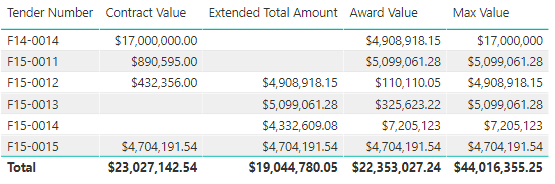
You can find the link here to the PBIX: https://1drv.ms/u/s!Apxn-69XhcAmiMITsW8F0_YUJPrZgg
- Mark as New
- Bookmark
- Subscribe
- Mute
- Subscribe to RSS Feed
- Permalink
- Report Inappropriate Content
Do you have some sample data that could be used?
As well as an expected output that could be worked towards.
- Mark as New
- Bookmark
- Subscribe
- Mute
- Subscribe to RSS Feed
- Permalink
- Report Inappropriate Content
- Mark as New
- Bookmark
- Subscribe
- Mute
- Subscribe to RSS Feed
- Permalink
- Report Inappropriate Content
EIdeal format would be one column with the corresponding $ Value that is highest of the three locations for each tender number.
- Mark as New
- Bookmark
- Subscribe
- Mute
- Subscribe to RSS Feed
- Permalink
- Report Inappropriate Content
- Mark as New
- Bookmark
- Subscribe
- Mute
- Subscribe to RSS Feed
- Permalink
- Report Inappropriate Content
Sorry, it actually was and posted in a single line. Trying again.
Sheet 1
Tender Number | Company Name | Award Value |
F14-0014 | Marys Hats | $4,908,918.15 |
F15-0011 | Marys Hats | $509,9061.28 |
F15-0012 | Marys Hats | $110,110.05 |
F15-0013 | Marys Hats | $325,623.22 |
F15-0014 | Marys Hats | $7,205,123.00 |
F15-0015 | Marys Hats | $4,704,191.54 |
Sheet 2
Tender Number | Closing Date | Trading As | Extended Total Amount | Contract No | Contract Value |
F14-0014 | 4/03/2015 | Bobs dogs |
| F14-0014 | $17,000,000 |
F15-0011 | 23/07/2015 | Bobs cats |
| F15-0011 | $890,595.00 |
F15-0012 | 20/05/2015 | Bobs trees | $4,908,918.15 | F15-0012 | $432,356.00 |
F15-0013 | 20/05/2015 | Bobs Bob | $5,099,061.28 | F15-0013 |
|
F15-0014 | 20/05/2015 | Bob Pink | $4,332,609.08 | F15-0014 |
|
F15-0015 | 20/05/2015 | Bob Black | $4,704,191.54 | F15-0015 | $4,704,191.54 |
- Mark as New
- Bookmark
- Subscribe
- Mute
- Subscribe to RSS Feed
- Permalink
- Report Inappropriate Content
Hi @ren
What I did was to load the data in Power Query, and then merge the data together on the "Tender Number"
What I did then was to create a new calculated column which gave me the Max Value across the 3 values
Max Value = MAX(MAX('Merge1'[Award Value],'Merge1'[Contract Value]),'Merge1'[Extended Total Amount])Which resulted in the final column in the table displaying the data as required.
You can find the link here to the PBIX: https://1drv.ms/u/s!Apxn-69XhcAmiMITsW8F0_YUJPrZgg
- Mark as New
- Bookmark
- Subscribe
- Mute
- Subscribe to RSS Feed
- Permalink
- Report Inappropriate Content
Thanks Gilbert!
- Mark as New
- Bookmark
- Subscribe
- Mute
- Subscribe to RSS Feed
- Permalink
- Report Inappropriate Content

Helpful resources

FabCon & SQLCon – Barcelona 2026
Join us in Barcelona for FabCon and SQLCon, the Fabric, Power BI, SQL, and AI community event. Save €200 with code FABCMTY200.

Fabric Community Sticker Challenge - Barcelona 2026
If you love stickers, then you will definitely want to check out our community sticker challenge, Barcelona edition!

Power BI Monthly Update - July 2026
Check out the July 2026 Power BI update to learn about new features.

Power BI DataViz World Championships - June 2026
A new Power BI DataViz World Championship is coming this June! Don't miss out on submitting your entry.

| User | Count |
|---|---|
| 30 | |
| 28 | |
| 25 | |
| 24 | |
| 16 |


| User | Count |
|---|---|
| 48 | |
| 32 | |
| 17 | |
| 16 | |
| 16 |


