Join us at FabCon Atlanta from March 16 - 20, 2026, for the ultimate Fabric, Power BI, AI and SQL community-led event. Save $200 with code FABCOMM.
Register now!Vote for your favorite vizzies from the Power BI Dataviz World Championship submissions. Vote now!
I need the following in DAX format.
Requirement: I have a table called Transactions which has 3 columns ID, [Billing Type] and [Year-Month] as mentioned below. I need to create a measure that should show that ID 1 receives its 10th Credit Card in the month of October, while ID 2 receives its 10th Credit Card in the month of May, while ID 3 receives its 10th Credit Card in the month of October.
So we have now 1 in May (2017-05) and 2 in Oct (2017-10)
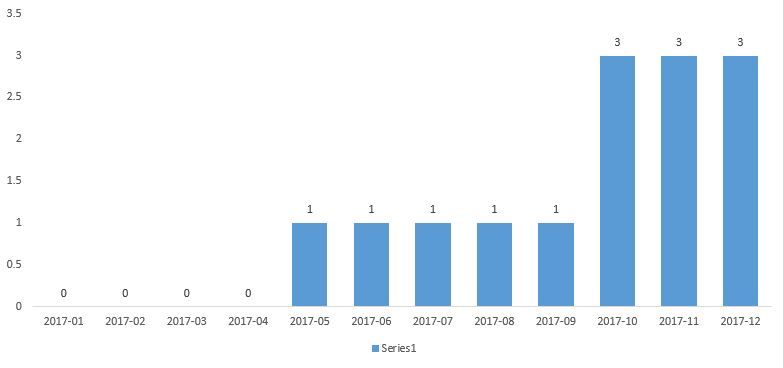
My expectation is that this measure would show 0 from 2017-01 through 2017-04, 1 from 2017-05 through 2017-09, and 3 from 2017-10 thru 2017-12.
Transactions Table
| ID | Billing Type | Year-Month |
| 1 | Credit Card | 2017-01 |
| 1 | Credit Card | 2017-02 |
| 1 | Credit Card | 2017-03 |
| 1 | Credit Card | 2017-04 |
| 1 | Credit Card | 2017-05 |
| 1 | Credit Card | 2017-06 |
| 1 | Credit Card | 2017-07 |
| 1 | Credit Card | 2017-08 |
| 1 | Credit Card | 2017-09 |
| 1 | Credit Card | 2017-10 |
| 1 | Credit Card | 2017-12 |
| 2 | Credit Card | 2017-01 |
| 2 | Credit Card | 2017-02 |
| 2 | Credit Card | 2017-02 |
| 2 | Credit Card | 2017-03 |
| 2 | Credit Card | 2017-03 |
| 2 | Credit Card | 2017-04 |
| 2 | Credit Card | 2017-04 |
| 2 | Credit Card | 2017-05 |
| 2 | Credit Card | 2017-05 |
| 2 | Credit Card | 2017-06 |
| 2 | Credit Card | 2017-12 |
| 3 | Credit Card | 2017-01 |
| 3 | Credit Card | 2017-06 |
| 3 | Credit Card | 2017-01 |
| 3 | Credit Card | 2017-01 |
| 3 | Credit Card | 2017-12 |
| 3 | Credit Card | 2017-01 |
| 3 | Credit Card | 2017-06 |
| 3 | Credit Card | 2017-12 |
| 3 | Credit Card | 2017-01 |
| 3 | Credit Card | 2017-10 |
| 5 | Credit Card | 2017-10 |
| 5 | Credit Card | 2017-12 |
I need to show the output as below
Now I need to get the same result using DAX. Can someone please help me to get the same using DAX?
Solved! Go to Solution.
@Anonymous
Please change the MEASURE to following
But i Have following observtions
1) 10 th occurence of ID 2 is in June
2) November 2017 date doesn't exist in your data
Measure =
VAR mycount =
CALCULATE (
COUNT ( TableName[ID] ),
FILTER (
ALL ( TableName ),
TableName[Year-Month] <= SELECTEDVALUE ( TableName[Year-Month] )
&& TableName[RANK] = 10
)
)
RETURN
IF ( ISBLANK ( mycount ), 0, mycount )
Hi @Anonymous
Try this technique
1) First Add an Index Column from the Query Editor
2) Then Add a RANK Calculated Colum
RANK =
RANKX (
FILTER ( TableName, TableName[ID] = EARLIER ( TableName[ID] ) ),
TableName[Index],
,
ASC,
DENSE
)3) Now you can use this MEASURE
Measure = CALCULATE ( COUNT ( TableName[ID] ), TableName[RANK] = 10 )
Sorry @Zubair_Muhammad, The result is not as expected
Until April (2017-05) there is no 10th Credit Card. We have 1 in May (2017-05) and then 2 in October (2017-10). So we have to plot 0 till April and 1 till September and since we have 2 in October, we have to sum up the May 1 and October 2 and show as 3 from October to December
@Anonymous
Please change the MEASURE to following
But i Have following observtions
1) 10 th occurence of ID 2 is in June
2) November 2017 date doesn't exist in your data
Measure =
VAR mycount =
CALCULATE (
COUNT ( TableName[ID] ),
FILTER (
ALL ( TableName ),
TableName[Year-Month] <= SELECTEDVALUE ( TableName[Year-Month] )
&& TableName[RANK] = 10
)
)
RETURN
IF ( ISBLANK ( mycount ), 0, mycount )
Vote for your favorite vizzies from the Power BI World Championship submissions!
If you love stickers, then you will definitely want to check out our Community Sticker Challenge!
Check out the January 2026 Power BI update to learn about new features.
| User | Count |
|---|---|
| 64 | |
| 51 | |
| 46 | |
| 23 | |
| 19 |
| User | Count |
|---|---|
| 136 | |
| 110 | |
| 50 | |
| 32 | |
| 29 |