cancel
Showing results for 
Search instead for 
Did you mean: 

July 7 - July 17 | Round 2 of the Power BI Dataviz World Championships. Don't miss your chance! Learn more

Reply
Anonymous
Not applicable

DAX

Hi,
I want to calculate a count of values in a column from the date of whatever the start date in my table till my filter selection (year & month )-1
For example, If I have data from Jan 2021 and My filter selection will be June 2022, my calculation should show from Jan 2021 to May 2022.
Please help me with the correct query.
TIA.

1 ACCEPTED SOLUTION
v-xiaotang
Community Support
Community Support

Hi @Anonymous 

>> in the slicer im using only Year and Month value.

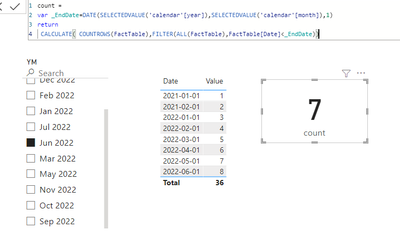
You can try this, create the measure below


count = 
var _EndDate=DATE(SELECTEDVALUE('calendar'[year]),SELECTEDVALUE('calendar'[month]),1)
return
 CALCULATE( COUNTROWS(FactTable),FILTER(ALL(FactTable),FactTable[Date]<_EndDate))


vxiaotang_0-1654580709384.png

 calendar table

vxiaotang_1-1654580801264.png


Best Regards,

Community Support Team _Tang

If this post helps, please consider Accept it as the solution to help the other members find it more quickly.

View solution in original post

5 REPLIES 5
v-xiaotang
Community Support
Community Support

Hi @Anonymous 

>> in the slicer im using only Year and Month value.

You can try this, create the measure below


count = 
var _EndDate=DATE(SELECTEDVALUE('calendar'[year]),SELECTEDVALUE('calendar'[month]),1)
return
 CALCULATE( COUNTROWS(FactTable),FILTER(ALL(FactTable),FactTable[Date]<_EndDate))


vxiaotang_0-1654580709384.png

 calendar table

vxiaotang_1-1654580801264.png


Best Regards,

Community Support Team _Tang

If this post helps, please consider Accept it as the solution to help the other members find it more quickly.

Anonymous
Not applicable

Thank you, It worked!!

Anonymous
Not applicable

Hi,

Yes, there is. 

Transactional data have dates but in the slicer im using only Year and Month value.

I'm using this dax currently,

QueuedLeads = CALCULATE(COUNT(table1[objectid]),USERELATIONSHIP(Calender[Date],table1[enteredon]))
 
Its showing the count from Jan 2021 to till date but if i select the month from filter, it shows only for the current month.
amitchandak
Super User
Super User

@Anonymous , Refer suggestion by @Signore_Ands . If that does not help, then refer


Using date table, you need to measure like


YTD =
var _max = eomonth(if(isfiltered('Date'),MAX( 'Date'[Date]) , today()),-1)
var _min = eomonth(_max,-1*MONTH(_max))+1
return
CALCULATE([net] ,DATESBETWEEN('Date'[Date],_min,_max))


If you need a trend of 5 months then use an independent date table


//Date1 is independent Date table, Date is joined with Table
new measure =
var _max = eomonth(maxx(allselected(Date1),Date1[Date]),-1)
var _min = eomonth(_max,-1*MONTH(_max))+1
return
calculate( sum(Table[Value]), filter('Date', 'Date'[Date] >=_min && 'Date'[Date] <=_max))


Need of an Independent Date Table:https://www.youtube.com/watch?v=44fGGmg9fHI

Share with Power BI Enthusiasts: Full Power BI Video (20 Hours) YouTube
Microsoft Fabric Series 60+ Videos YouTube
Microsoft Fabric Hindi End to End YouTube
Signore_Ands
Advocate III
Advocate III

Hi @Anonymous - 
Do you have a Date dimension in your model?  That would be the starting point.
And does your transactional data have dates (e.g. dd/mm/yy) or just a Year and Month value?

This may help in terms of creating the date dimension: All in One: Script to Create Date Dimension in Power BI using Power Query - RADACAD


Helpful resources

Announcements
FabCon and SQLCon Barcelona 2026

FabCon & SQLCon – Barcelona 2026

Join us in Barcelona for FabCon and SQLCon, the Fabric, Power BI, SQL, and AI community event. Save €200 with code FABCMTY200.

60 days of Data Days Carousel

Data Days 2026

Join Fabric Data Days 2026: 60 days of free live/on-demand sessions, challenges, study groups, and certification opportunities.

Power BI DataViz World Championships carousel

Power BI DataViz World Championships - June 2026

A new Power BI DataViz World Championship is coming this June! Don't miss out on submitting your entry.