Don't miss your chance to take the Fabric Data Engineer (DP-600) exam for FREE! Find out how by watching the DP-600 session on-demand now through April 28th.
Learn moreJoin the FabCon + SQLCon recap series. Up next: Power BI, Real-Time Intelligence, IQ and AI, and Data Factory take center stage. All sessions are available on-demand after the live show. Register now
Hello,
I am trying to flag patients who had been given a medicine within 48 hours of admission.
Any suggestions are highly appreciated.
Count = DISTINCTCOUNT(query[24hourflag])-1
Example:
ID Admittime MEDTIME 24hourflag
101 01JAN2017 :1AM 01JAN2017 :11PM 101
101 01JAN2017 :1AM 02JAN2017 :6AM blank
102 08JAN2017:5PM 11JAN2017:5PM blank
Thanks
DISTINCTCOUNT counts ALL blanks as 1 distinct value
To get rid of the -1 use this measure instead
Measure =
CALCULATE (
DISTINCTCOUNT ( query[24hourflag] ),
FILTER ( query, query[24hourflag] <> BLANK () )
)
Thanks Sean, I will use the filter next time.
But can you explain what the -1 is doing in our previous formulae?
Thanks
Okay =>DISTINCTCOUNT counts ALL blanks as 1 distinct value
This means ALL Rows in the [24Hourflag] Column that are BLANK will count as 1 => meaning this 1 will be added to the Total
Say you have 5 distinct non-blank values => your formula without the -1 will return 6
because 5 distinct non blank + 1 for all blanks
so the - 1 deducts the blanks
Does this make sense? ![]()
EDIT:
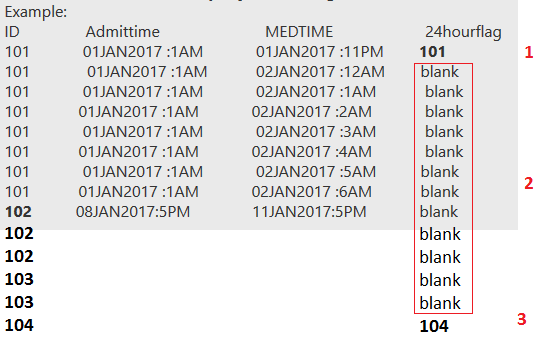
Look at the picture....
DISTINCTCOUNT will return 3
without - 1 or the FILTER function filtering out the blanks
So it will group all the Non Blanks (counts all non blanks which is 5 in your example) and all the blanks(count will be 1 for all of them).
When we say -1 , it removes the group which has a count of 1?
Is that right??
COUNT_ID COUNT_BKLANK
5 1
Check out the April 2026 Power BI update to learn about new features.
If you have recently started exploring Fabric, we'd love to hear how it's going. Your feedback can help with product improvements.
A new Power BI DataViz World Championship is coming this June! Don't miss out on submitting your entry.
| User | Count |
|---|---|
| 42 | |
| 35 | |
| 35 | |
| 21 | |
| 15 |
| User | Count |
|---|---|
| 65 | |
| 58 | |
| 28 | |
| 27 | |
| 25 |