Join us at FabCon Atlanta from March 16 - 20, 2026, for the ultimate Fabric, Power BI, AI and SQL community-led event. Save $200 with code FABCOMM.
Register now!Get Fabric Certified for FREE during Fabric Data Days. Don't miss your chance! Request now
Hi Everyone,
Just wondering if someone could give me a pointer on how to calculate a "worst case" per location on a project status table. My data looks like this
Country, Project, Project Completed, Project In Progress, Project Not Yet Started
=====================================================
CountryA, Project A, "Yes", "No", "No"
CountryA, Project B, "Yes", "No", "No"
CountryA, Project C, "No", "Yes", "No"
CountryA, Project D, "No", "No", "Yes"
CountryB, Project A, "No", "No", "Yes"
CountryB, Project B, "Yes", "No", "No"
CountryB, Project C, "No", "Yes", "No"
CountryB, Project D, "No", "No", "Yes"
CountryA, Project A, "Yes", "No", "No"
CountryA, Project B, "Yes", "No", "No"
CountryA, Project C, "Yes", "No", "No"
CountryA, Project D, "Yes", "No", "No"
I would like to give each country a status. If a country has any projects "Not started" then they get a status of "Not started", if they have any projects "in progress" then their status is "In progress", and finally if a country has only completed projects they get a status of "Completed" projects
Then I would like to count the countries by status in 3 different measures.
From the data above
#Number of Countries With Projects Not Started = 2
#Number of Countries With Projects In Progress = 0
#Number of Countries With All Projects Completed = 1
Thanks in advance
Alex
Solved! Go to Solution.
You can also simply replace the first 3 steps in my previous reply with a calculated column.
Attribute = SWITCH(TRUE(), 'Table'[Project Not Yet Started]="Yes","Project Not Yet Started",'Table'[Project In Progress]="yes","Project In Progress","Project Completed")
You can also simply replace the first 3 steps in my previous reply with a calculated column.
Attribute = SWITCH(TRUE(), 'Table'[Project Not Yet Started]="Yes","Project Not Yet Started",'Table'[Project In Progress]="yes","Project In Progress","Project Completed")
Thanks Eric that really helped me out - many thanks
Alex
Hi Eric,
thanks so much for getting back. I will give it a try and confirm.
Thanks
Alex
@athomp15 wrote:
Hi Everyone,
Just wondering if someone could give me a pointer on how to calculate a "worst case" per location on a project status table. My data looks like this
Country, Project, Project Completed, Project In Progress, Project Not Yet Started
=====================================================
CountryA, Project A, "Yes", "No", "No"
CountryA, Project B, "Yes", "No", "No"
CountryA, Project C, "No", "Yes", "No"
CountryA, Project D, "No", "No", "Yes"
CountryB, Project A, "No", "No", "Yes"
CountryB, Project B, "Yes", "No", "No"
CountryB, Project C, "No", "Yes", "No"
CountryB, Project D, "No", "No", "Yes"
CountryA, Project A, "Yes", "No", "No"
CountryA, Project B, "Yes", "No", "No"
CountryA, Project C, "Yes", "No", "No"
CountryA, Project D, "Yes", "No", "No"
I would like to give each country a status. If a country has any projects "Not started" then they get a status of "Not started", if they have any projects "in progress" then their status is "In progress", and finally if a country has only completed projects they get a status of "Completed" projects
Then I would like to count the countries by status in 3 different measures.
From the data above
#Number of Countries With Projects Not Started = 2
#Number of Countries With Projects In Progress = 0
#Number of Countries With All Projects Completed = 1
Thanks in advance
Alex
Here's my approach for your reference.
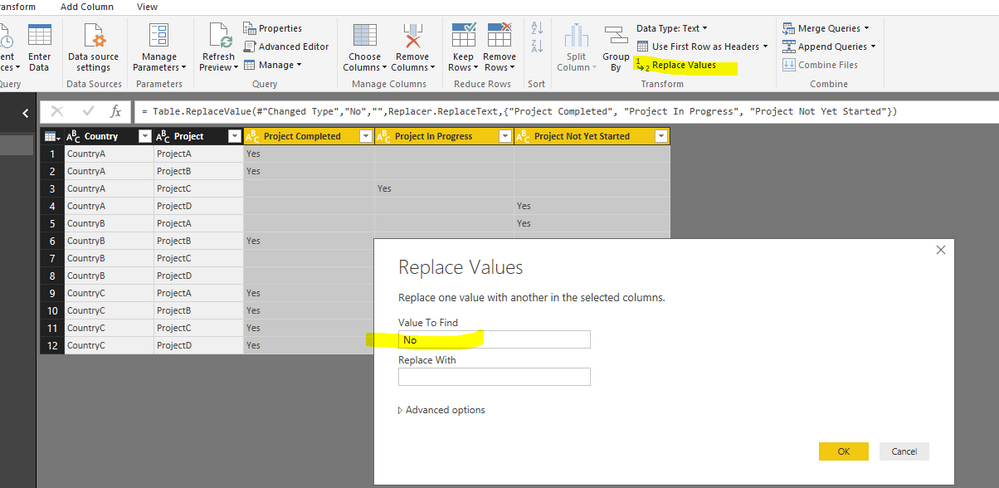
1. Replace the "No" to blank values in those 3 columns
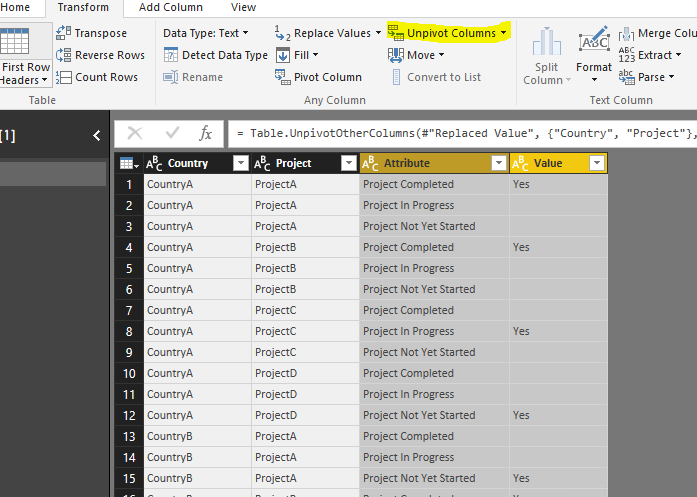
2. Unpivot those 3 columns
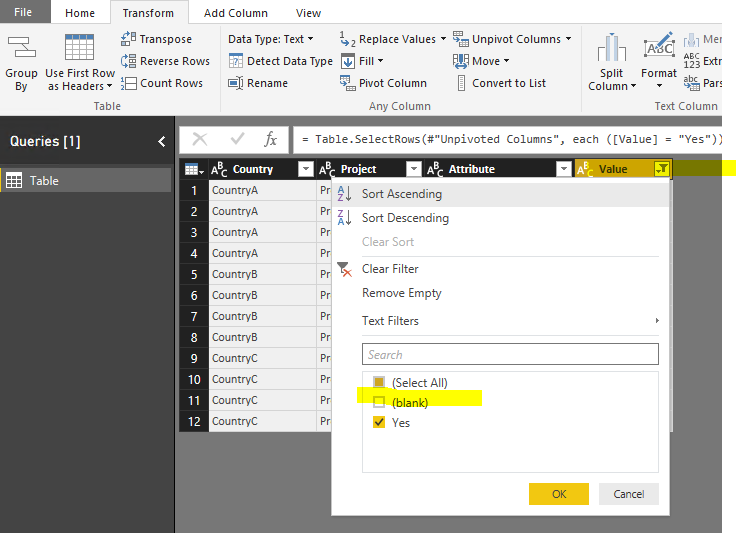
3.Filter out the blank vlaues
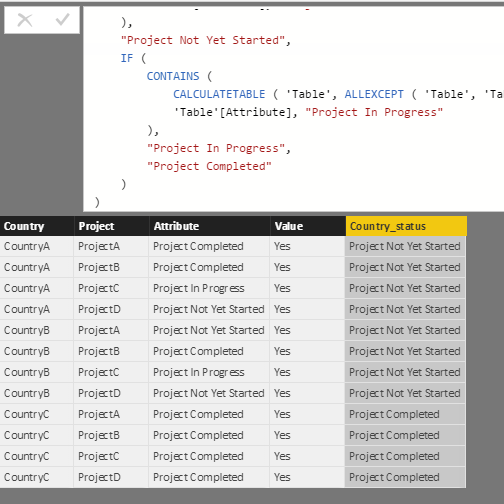
4. create a calculated column as
Country_status =
IF (
CONTAINS (
CALCULATETABLE ( 'Table', ALLEXCEPT ( 'Table', 'Table'[Country] ) ),
'Table'[Attribute], "Project Not Yet Started"
),
"Project Not Yet Started",
IF (
CONTAINS (
CALCULATETABLE ( 'Table', ALLEXCEPT ( 'Table', 'Table'[Country] ) ),
'Table'[Attribute], "Project In Progress"
),
"Project In Progress",
"Project Completed"
)
)
5. Create a calculated table as below.
Table 2 = VALUES('Table'[Attribute])
6. At last, create a measure as below.
cnt = IF(ISBLANK(DISTINCTCOUNT('Table'[Country])),0,DISTINCTCOUNT('Table'[Country]))
See more details in the attached pbix file.
Check out the November 2025 Power BI update to learn about new features.
Advance your Data & AI career with 50 days of live learning, contests, hands-on challenges, study groups & certifications and more!