Fabric Data Days starts November 4th!
Advance your Data & AI career with 50 days of live learning, dataviz contests, hands-on challenges, study groups & certifications and more!
Get registered- Power BI forums
- Get Help with Power BI
- Desktop
- Service
- Report Server
- Power Query
- Mobile Apps
- Developer
- DAX Commands and Tips
- Custom Visuals Development Discussion
- Health and Life Sciences
- Power BI Spanish forums
- Translated Spanish Desktop
- Training and Consulting
- Instructor Led Training
- Dashboard in a Day for Women, by Women
- Galleries
- Data Stories Gallery
- Themes Gallery
- Contests Gallery
- Quick Measures Gallery
- Visual Calculations Gallery
- Notebook Gallery
- Translytical Task Flow Gallery
- TMDL Gallery
- R Script Showcase
- Webinars and Video Gallery
- Ideas
- Custom Visuals Ideas (read-only)
- Issues
- Issues
- Events
- Upcoming Events
Join us at FabCon Atlanta from March 16 - 20, 2026, for the ultimate Fabric, Power BI, AI and SQL community-led event. Save $200 with code FABCOMM. Register now.
- Power BI forums
- Forums
- Get Help with Power BI
- Desktop
- Re: DAX using IF. I get an incorrect total.
- Subscribe to RSS Feed
- Mark Topic as New
- Mark Topic as Read
- Float this Topic for Current User
- Bookmark
- Subscribe
- Printer Friendly Page


- Mark as New
- Bookmark
- Subscribe
- Mute
- Subscribe to RSS Feed
- Permalink
- Report Inappropriate Content
DAX using IF (aggregation within another aggregation). I get an incorrect total.
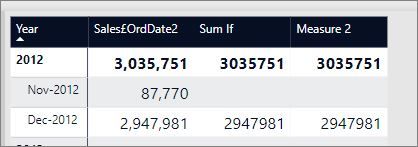
What I want is the total to equal 2,947,891 for Sumif and Measure 2
The three measures were
Sales£OrdDate2
Solved! Go to Solution.


- Mark as New
- Bookmark
- Subscribe
- Mute
- Subscribe to RSS Feed
- Permalink
- Report Inappropriate Content
Hi @RJ
You may refer to below post.
https://community.powerbi.com/t5/Desktop/SUM-Negative-Account-Balances/m-p/544179#M255705
Regards,
Cherie
If this post helps, then please consider Accept it as the solution to help the other members find it more quickly.
- Mark as New
- Bookmark
- Subscribe
- Mute
- Subscribe to RSS Feed
- Permalink
- Report Inappropriate Content
Brilliant
It worked. Thank you
- Mark as New
- Bookmark
- Subscribe
- Mute
- Subscribe to RSS Feed
- Permalink
- Report Inappropriate Content
To make it more effecient. Add 'ADDCOLUMN'


- Mark as New
- Bookmark
- Subscribe
- Mute
- Subscribe to RSS Feed
- Permalink
- Report Inappropriate Content
Hi,
Does this work?
=CALCULATE(SUMX(VALUES(Calendar[Month-Year]),[Sales£M]),FILTER(Header,[Sales£M]>0),USERELATIONSHIP(Header[Order Date] , Dates[Date]))
Regards,
Ashish Mathur
http://www.ashishmathur.com
https://www.linkedin.com/in/excelenthusiasts/
- Mark as New
- Bookmark
- Subscribe
- Mute
- Subscribe to RSS Feed
- Permalink
- Report Inappropriate Content
Thanks Ashish
I will try this when I return.
Its an aggregation within an aggregation issue but Power BI must have an solution for this. But I will try your measure later
- Mark as New
- Bookmark
- Subscribe
- Mute
- Subscribe to RSS Feed
- Permalink
- Report Inappropriate Content
Ill try this tomorrow
DAX Measure with Nested IF Statements#

Re: DAX Measure with Nested IF Statements
[ New ]01-14-2017 08:04 PM - edited 01-14-2017 08:08 PM
@MWinter225If you do want Measures - these should work also! 
MEASURE 1
Total Adj Sales ALT =
SUMX (
    'Table',
    IF (
        'Table'[Adjustment] = "b",
        'Table'[Sales] * 0.9,
        IF ( 'Table'[Adjustment] = "c", 'Table'[sales] * 0.5, 'Table'[Sales] )
    )
)
MEASURE 2 - SWITCH is internally converted into nested IFs - one thing I really like is that its much easier to read and write
Total Adj Sales ALT 2 =
SUMX (
    'Table',
    SWITCH (
        TRUE (),
        'Table'[Adjustment] = "b", 'Table'[Sales] * 0.9,
        'Table'[Adjustment] = "c", 'Table'[sales] * 0.5,
        'Table'[Sales]
    )
)
Now you have 3 options which should all give you the same result!
Good Luck!
[
- Mark as New
- Bookmark
- Subscribe
- Mute
- Subscribe to RSS Feed
- Permalink
- Report Inappropriate Content
- Mark as New
- Bookmark
- Subscribe
- Mute
- Subscribe to RSS Feed
- Permalink
- Report Inappropriate Content
Hi @RJ
You may refer to below post.
https://community.powerbi.com/t5/Desktop/SUM-Negative-Account-Balances/m-p/544179#M255705
Regards,
Cherie
If this post helps, then please consider Accept it as the solution to help the other members find it more quickly.
- Mark as New
- Bookmark
- Subscribe
- Mute
- Subscribe to RSS Feed
- Permalink
- Report Inappropriate Content
Brilliant
It worked. Thank you
- Mark as New
- Bookmark
- Subscribe
- Mute
- Subscribe to RSS Feed
- Permalink
- Report Inappropriate Content
To make it more effecient. Add 'ADDCOLUMN'
- Mark as New
- Bookmark
- Subscribe
- Mute
- Subscribe to RSS Feed
- Permalink
- Report Inappropriate Content
Hi Cherie
Thanks
This looks promising.
NegativeSum =
VAR tableA = SUMMARIZE ( Table4, Table4[Client ], "a", CALCULATE ( SUM ( Table4[Amount] ) ) )
RETURN CALCULATE ( SUM ( Table4[Amount] ), FILTER ( tableA, [a] < 0 ) )

Helpful resources

Power BI Monthly Update - October 2025
Check out the October 2025 Power BI update to learn about new features.

FabCon Atlanta 2026
Join us at FabCon Atlanta, March 16-20, for the ultimate Fabric, Power BI, AI and SQL community-led event. Save $200 with code FABCOMM.


