cancel
Showing results for 
Search instead for 
Did you mean: 

The Power BI Data Visualization World Championships is back! Get ahead of the game and start preparing now! Learn more

Reply
donaldo
Helper III
Helper III

DAX to replace value with another in same column depending on 2nd column

Hey all,


I have a curious problem due to the way data I am using is stored.


I have the table below .5to4.PNGAnd I need to replace the ID (column a) of all the rows where Level is = 5, with the ID of the same Idea (column b) where the level is = 4. So the unique ID of Ideas at Level 4 is linked to some data I also need for Level 5.
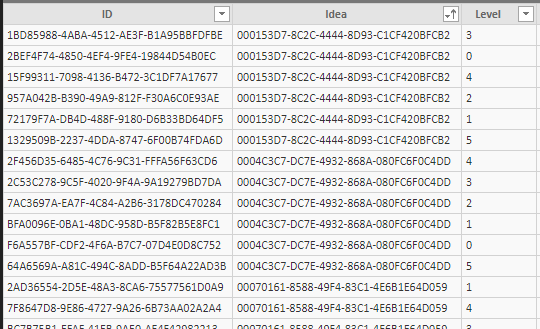
 

I've tried creating a new column to use for this purpose with the DAX below; but it gives me "A table of multiple values was supplied where a single value was expected". I've tried wrapping it all in FIRSTNONBLANK with same result. 


IL5 to IL4 = 
 FIRSTNONBLANK(ImplementationLevel[ID]; IF(
    VALUE(ImplementationLevel[Level]) = 1;
    LOOKUPVALUE(ImplementationLevel[ID];ImplementationLevel[Idea];ImplementationLevel[Idea];ImplementationLevel[Level];"1");
    IF(VALUE(ImplementationLevel[Level]) = 2;
    LOOKUPVALUE(ImplementationLevel[ID];ImplementationLevel[Idea];ImplementationLevel[Idea];ImplementationLevel[Level];"2");
    IF(VALUE(ImplementationLevel[Level]) = 3;
    LOOKUPVALUE(ImplementationLevel[ID];ImplementationLevel[Idea];ImplementationLevel[Idea];ImplementationLevel[Level];"3");
    IF(VALUE(ImplementationLevel[Level]) = 4;
    LOOKUPVALUE(ImplementationLevel[ID];ImplementationLevel[Idea];ImplementationLevel[Idea];ImplementationLevel[Level];"4");
    IF(VALUE(ImplementationLevel[Level]) = 5;
    LOOKUPVALUE(ImplementationLevel[ID];ImplementationLevel[Idea];ImplementationLevel[Idea];ImplementationLevel[Level];"4"))
    )))))


1 ACCEPTED SOLUTION

@donaldo Could you please check and confirm... whether the data contains same idea (duplicates) at same level (in this case it is 4). Even though it has a different ID.


Did I answer your question? Mark my post as a solution!

Proud to be a PBI Community Champion


View solution in original post

3 REPLIES 3
PattemManohar
Community Champion
Community Champion

@donaldo Please try this as a New Column


NewID = 
VAR _CurrentIdea = Test178CondReplace[Idea]
VAR _Level4ID = LOOKUPVALUE(Test178CondReplace[ID],Test178CondReplace[Idea],_CurrentIdea,Test178CondReplace[Level],4)
RETURN IF(Test178CondReplace[Level]=5,_Level4ID,Test178CondReplace[ID])

image.png


Did I answer your question? Mark my post as a solution!

Proud to be a PBI Community Champion


Hey @PattemManohar


Thanks for the suggestion. I'm getting the same error. 

pbi help.PNG


NewID = 
VAR _CurrentIdea = ImplementationLevel[Idea]
VAR _Level4ID = LOOKUPVALUE(ImplementationLevel[ID];ImplementationLevel[Idea];_CurrentIdea;ImplementationLevel[Level];"4")
RETURN IF(ImplementationLevel[Level]="5";_Level4ID;ImplementationLevel[ID])

I've put the Levels in "" as they are formatted as Text (elsewhere I don't want them to be treated as numbers).


Why does it return multiple values? ID column is unique values.

@donaldo Could you please check and confirm... whether the data contains same idea (duplicates) at same level (in this case it is 4). Even though it has a different ID.


Did I answer your question? Mark my post as a solution!

Proud to be a PBI Community Champion


Helpful resources

Announcements
Power BI DataViz World Championships

Power BI Dataviz World Championships

The Power BI Data Visualization World Championships is back! Get ahead of the game and start preparing now!

November Power BI Update Carousel

Power BI Monthly Update - November 2025

Check out the November 2025 Power BI update to learn about new features.

FabCon Atlanta 2026 carousel

FabCon Atlanta 2026

Join us at FabCon Atlanta, March 16-20, for the ultimate Fabric, Power BI, AI and SQL community-led event. Save $200 with code FABCOMM.
